Billing & Sales
How to Choose Billing Software for Small Shops in India
Compare billing software for small shops in India. Learn what to check in GST invoices, inventory, payment options, reports, offline access, and pricing.
How to Choose Billing Software for Small Shops in India
Billing software for small shops can make everyday sales easier to record, invoices simpler to prepare, and business records more organized. But with many billing apps available, how do you choose the right one for your shop?
The best option depends on the products you sell, the number of daily transactions you handle, your invoicing requirements, and the records you need to maintain.
A grocery shop, fertilizer store, medical store, hardware shop, and clothing store may all need billing software, but their day-to-day requirements can differ.
In this guide, we'll explain the important features to compare before choosing billing software, the questions to ask about GST invoicing, and how to evaluate whether an app is suitable for your business.
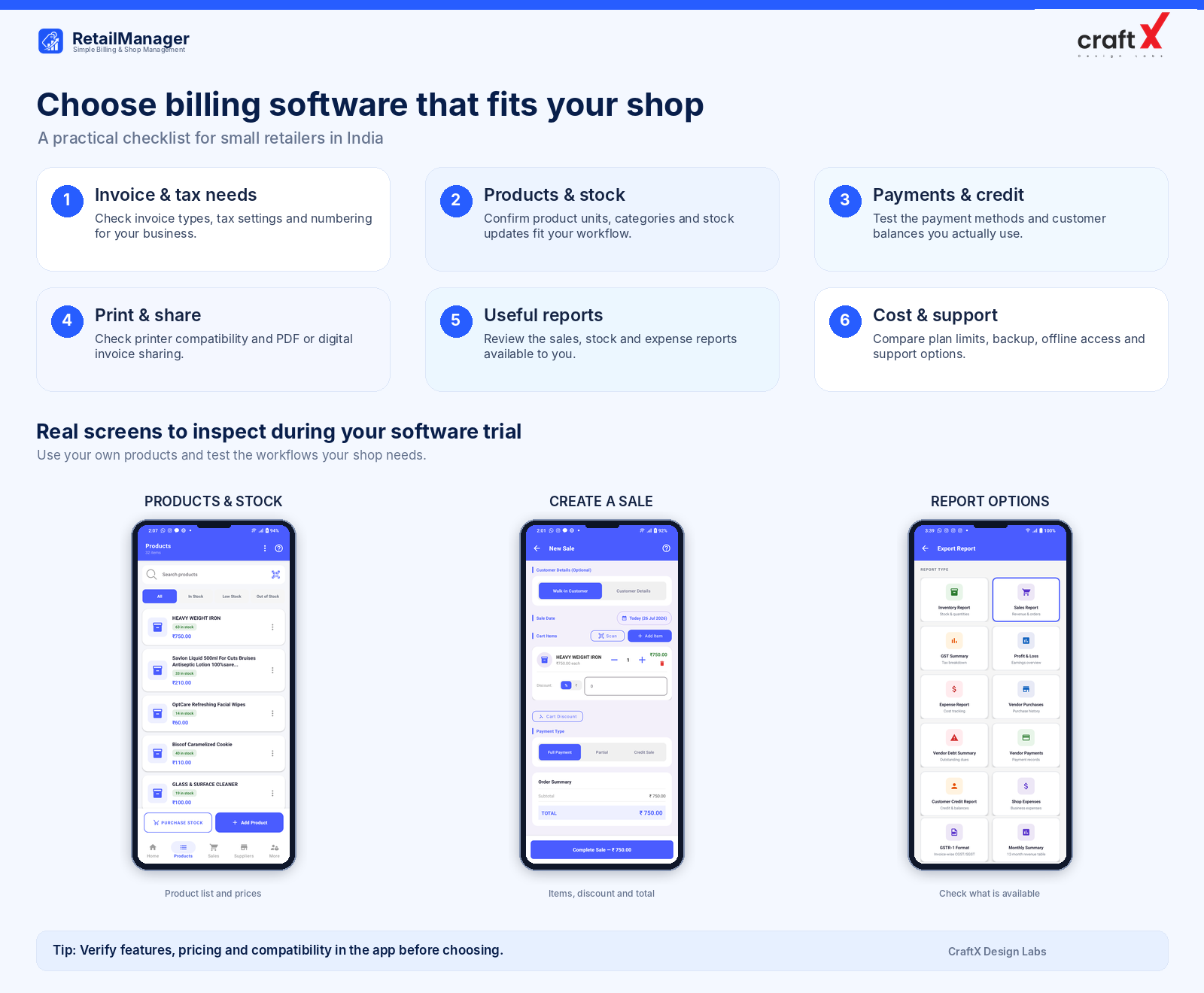
1. Start with Your Shop's Actual Needs
Before comparing apps, list the tasks you perform every day.
Think about how you currently create bills, record purchases, manage products, accept payments, and check sales totals.
For example, you might need software that can:
- Create bills quickly during busy hours.
- Maintain product names, prices, and stock quantities.
- Apply discounts and calculate invoice totals.
- Record cash, UPI, and credit transactions.
- Print invoices or share them digitally.
- Maintain customer and supplier records.
- Generate useful sales and inventory reports.
Not every shop needs every feature. A small stationery shop with a limited product range may have simpler requirements than a hardware store that manages hundreds of different products.
Write down your three most time-consuming billing or recordkeeping tasks first. Use those problems as your starting point when comparing apps.
2. Check GST and Invoice Requirements
For Indian retailers, invoice requirements are an important consideration.
Depending on your registration status and business circumstances, you may need software that supports the appropriate type of invoice and applicable tax details.
Before selecting an app, check whether it supports the invoicing workflows relevant to your business, including:
- GST and non-GST billing, where applicable.
- Appropriate tax rates and tax calculations.
- Invoice numbering and dates.
- Product descriptions, quantities, and prices.
- Relevant supplier and customer details.
- Invoice printing, PDF generation, or sharing.
- Suitable tax and sales reports.
Do not assume that every business requires the same invoice format. For example, the documentation requirements for a registered taxpayer issuing a tax invoice can differ from those applicable to a business that issues a bill of supply.
You can refer to the Central Board of Indirect Taxes and Customs (CBIC) invoice rules for the applicable requirements.
Important: Having billing software does not automatically make your business GST-compliant. Confirm that your setup and invoice types are appropriate for your registration status and current rules. Consult a qualified tax professional when necessary.
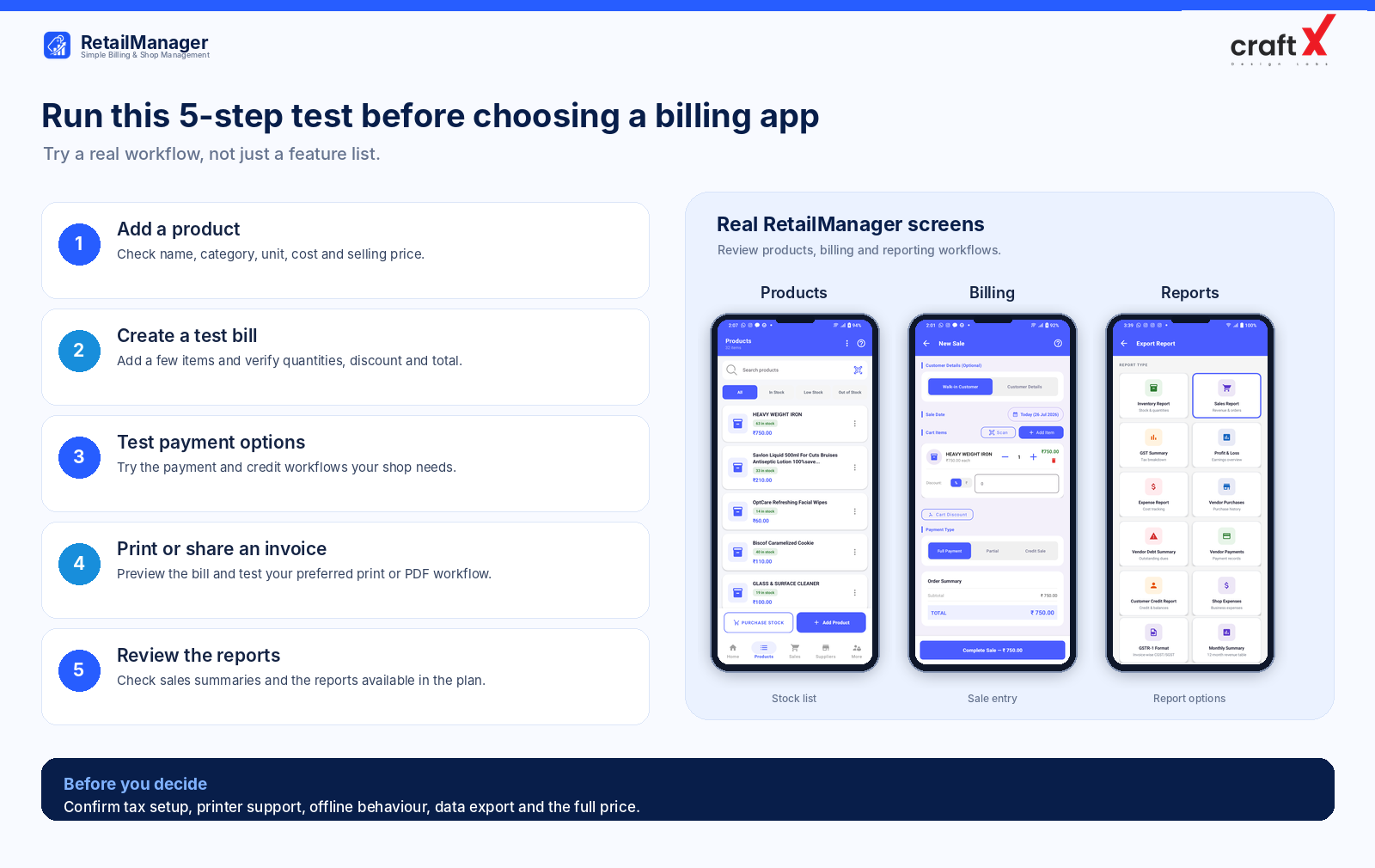
3. Look for Simple Product and Inventory Management
Billing and inventory often work together.
When a product is sold, you may want its recorded stock quantity to update automatically. When new goods arrive from a supplier, you need a reliable process for recording the received quantities.
Look for software that supports the product workflows your shop needs, such as:
- Adding and editing products.
- Organizing products into categories.
- Maintaining purchase and selling prices.
- Recording stock quantities and units.
- Searching for products quickly.
- Using barcodes where appropriate.
- Identifying products that are running low.
For example, imagine you manage an electrical shop that sells switches, cables, lights, and other components. Finding a specific product quickly and maintaining its correct selling price can make billing more efficient.
A billing app with suitable inventory functions may also reduce the need to maintain completely separate sales and stock records.
Before choosing, ask how the software handles returns, damaged goods, and stock adjustments. These situations matter because recorded stock is only useful when important stock movements are captured accurately.
4. Check Payment Options and Credit Tracking
Retail businesses may receive payments through several methods.
Your billing software should support the payment workflows your customers actually use.
Depending on your business, these might include:
- Cash payments.
- UPI payments.
- Bank or other supported payment methods.
- Credit sales and later collections.
- Split payments, if your shop needs them.
Also check whether the system distinguishes between a completed sale and the payment received.
For example, suppose a customer purchases goods worth ₹2,500 and pays ₹1,500 immediately. The remaining ₹1,000 is outstanding.
You need a clear way to record the sale, the amount received, and the remaining customer balance.
Similarly, if you purchase goods from suppliers on credit, you may want to maintain purchase records, outstanding balances, and payments made.
Some apps handle only basic billing, while broader retail management apps also organize customer and supplier records. Choose based on your actual requirements.
5. Make Sure Invoices Are Easy to Print or Share
A useful billing app should fit the way you provide bills to customers.
Depending on how your shop operates, you may need:
- Standard invoice printing.
- Support for a compatible thermal printer.
- PDF invoice generation.
- Digital invoice sharing.
- Clear invoice layouts that customers can read easily.
For example, a busy neighbourhood shop may prefer a small receipt printer, while another business may find it more convenient to share a PDF invoice through a messaging application.
Before subscribing, test the complete process. Create a sample bill, check the displayed details, print or share it, and confirm that the result is readable.
Also verify printer compatibility before buying new hardware. Not every app supports every printer or connection type.
6. Review the Reports You Will Actually Use
Billing software should do more than create invoices if you also want to understand how your shop is performing.
Useful reporting features may include:
- Daily, weekly, and monthly sales.
- Product sales summaries.
- Purchase reports.
- Inventory reports.
- Expense records and reports.
- Customer outstanding balances.
- Supplier payment records.
- Profit and loss reports, where supported.
Think about the decisions you want to make with these reports.
Do you want to understand which products sell well? Check whether sales reports provide useful product-level information.
Do you want to estimate profitability? Confirm what the profit report includes, how product costs are recorded, and whether expenses and inventory values are handled appropriately.
A sales total alone is not the same as profit. If you want to understand the difference, read our guide on how to calculate retail shop profit.
7. Check Offline Access, Backup, and Data Security
For businesses that rely on a phone or tablet throughout the day, connectivity and data protection are important practical considerations.
Ask these questions before choosing software:
Does it work without an internet connection?
If your shop has unreliable connectivity, check whether billing and product management remain available offline. Find out which operations work offline and how pending changes synchronize when the internet returns.
Can you back up or export your records?
Understand how the app stores data and whether you can recover information or export important business records when needed.
How is your data protected?
Look for appropriate account security, access controls, backup practices, and clear privacy information.
What happens if you change devices?
Check the process for signing in, restoring your records, and transferring your workflow to a new device.
Don't rely on a software provider's general statement that data is secure. Review its actual backup, recovery, and access arrangements.
8. Choose Software That Is Easy for You and Your Staff
Feature lists are useful, but an app must also be practical to use.
Before committing to a billing system, test a typical working session.
Try adding a product, finding an existing product, creating a bill, applying a discount, recording a payment, and reviewing the day's sales.
If your shop uses barcode scanning or a printer, test those workflows with your own equipment.
You should also consider whether the interface is available in a language you and your staff are comfortable using.
A simple interface can reduce the effort needed to train staff and may help your team maintain records consistently.
9. Compare Total Cost, Not Just the Advertised Price
Billing apps may offer free versions, paid subscriptions, trials, or different feature tiers.
A free plan can be a sensible starting point, but check its limits before depending on it for daily business operations.
Compare the complete cost of using each option, including:
- Monthly or annual subscription fees.
- Limits on products or bills.
- Paid reports or advanced features.
- Printer and hardware costs.
- Additional user charges, where applicable.
- Training or support costs.
For example, an inexpensive plan may be sufficient for a shop with a small product range and limited transactions. A growing store may need more products, advanced reporting, or additional workflows.
Choose the plan that fits your current business and leaves room for reasonable growth. Verify the latest pricing and included features directly with the provider because plans can change.
10. Compare Billing Software with a Practical Checklist
Before making your final choice, use this checklist when evaluating two or three apps.
| What to compare | Questions to ask |
|---|---|
| Billing | Can you create and revise bills through your required workflow? |
| GST | Does the invoicing setup suit your business requirements? |
| Products | Can you maintain the products, prices, categories, and units you need? |
| Inventory | Are stock changes recorded appropriately after sales and purchases? |
| Payments | Can you record your required payment methods and credit balances? |
| Invoices | Can you print or share invoices in your preferred format? |
| Reports | Are the reports useful for your decisions? |
| Offline use | Which features work without connectivity? |
| Data | Can you back up, export, and recover important records? |
| Cost | Are the limits, charges, and included features acceptable? |
| Support | Can you get help when something goes wrong? |
If possible, test a sample product list and a few realistic transactions before committing to a plan.
A short trial using your actual workflow can reveal practical limitations that are not obvious from a marketing page.
Is RetailManager Worth Considering for Your Shop?
RetailManager is designed to bring several everyday retail workflows together in one app.
Its listed features include product and inventory management, smart billing, barcode-scanner support, invoice printing and PDF sharing, GST reports, vendor management, customer credit tracking, offline use, and support for English, Hindi, Telugu, and Kannada.
Depending on the plan, the app can also provide additional reporting and business-management features. Review the current plan details before deciding which option fits your requirements.
If you want to explore those features, you can download RetailManager on Google Play.
The right billing software is the one that fits your daily workflow, supports your invoicing needs, maintains useful records, and offers good value for your business.
Frequently Asked Questions
Which billing software is best for a small shop in India?
The best option depends on your products, invoicing requirements, transaction volume, inventory needs, budget, and preferred workflow. Compare a few suitable apps against the same checklist before choosing.
Is free billing software enough for a small retail shop?
It may be enough if the free plan includes all the features and transaction limits your shop needs. Check product limits, bill limits, reporting features, support, and any charges before relying on it.
Does billing software automatically handle GST compliance?
Not necessarily. The software must support the relevant invoicing requirements, and you must configure and use it appropriately for your business. Confirm current requirements with official guidance or a qualified tax professional.
Should I choose billing software with inventory management?
If you need to track product quantities, purchases, and stock levels, integrated inventory functionality may reduce duplicated work. If your business has minimal stock requirements, a simpler solution might be sufficient.
Can billing software work without the internet?
Some apps support offline operations, while others depend on connectivity. Confirm exactly which features remain available offline and how data synchronizes when the connection returns.
What should I test before choosing a billing app?
Try adding products, creating bills, recording payments, checking stock changes, reviewing reports, printing or sharing an invoice, and verifying the recovery or export process.
Final Thoughts
Choosing billing software is an important decision because the system can become part of your everyday business routine.
Start with the problems you want to solve. Compare invoicing, inventory, payment handling, reporting, security, usability, and total cost. Test a few realistic transactions before making your decision.
A well-chosen billing app should make recordkeeping easier and give you a clearer view of your shop's operations, without adding unnecessary complexity or expense.
- #Billing Software
- #Retail Billing
- #GST Invoicing
- #Small Business
- #Retail Management