Inventory & Purchasing
How to Manage Expiry Dates and Batch Numbers in a Retail Shop
Learn how to track product batches, review near-expiry stock, use FEFO rotation, and reduce avoidable losses in your retail shop.
For a retail shop, expiry date management is essential for tracking product batches, identifying items approaching their expiry dates, and preventing products from remaining on shelves beyond their permitted selling period. Whether you run a grocery store, pharmacy, supermarket, cosmetics shop, or fertilizer business, checking expiry dates only when products arrive is not enough. You need a consistent process for recording batches, arranging stock, and reviewing upcoming dates.
Imagine receiving the same product from a supplier in two different deliveries. Both deliveries contain the same product name and quantity, but their expiry dates are different. If you manage them as one combined stock quantity, you may accidentally sell the later-expiring batch first while the earlier batch remains on the shelf.
A proper expiry tracking process helps you identify these differences and make better decisions about purchasing, storage, stock rotation, and product handling.
In this guide, we will explain batch tracking, FIFO and FEFO methods, near-expiry stock monitoring, and practical expiry management routines that small retail businesses can follow.
1. Why Is Expiry Date Management Important?
Products with limited shelf lives need more attention than ordinary merchandise. Even when a product sells regularly, poor stock rotation can leave older batches untouched.
Without a proper process, a retail shop may experience:
- Products remaining on shelves after their permitted selling period.
- Financial losses from unsold or unsaleable inventory.
- Customer complaints about products with insufficient remaining shelf life.
- Difficulty identifying which batch was received from a particular supplier.
- Problems checking product details during returns or quality complaints.
- Inaccurate inventory records when expired goods are not removed correctly.
Consider a grocery shop that receives 40 packets of a packaged food product every week. If the shop records only the total quantity as 160 packets, it may not know which delivery has the earliest expiry date.
Batch-wise tracking provides a clearer picture of the stock available for sale and the stock that needs attention.
2. Understand Batch Numbers and Expiry Dates
Before creating an expiry tracking system, understand the information printed on product packaging.
What is a batch number?
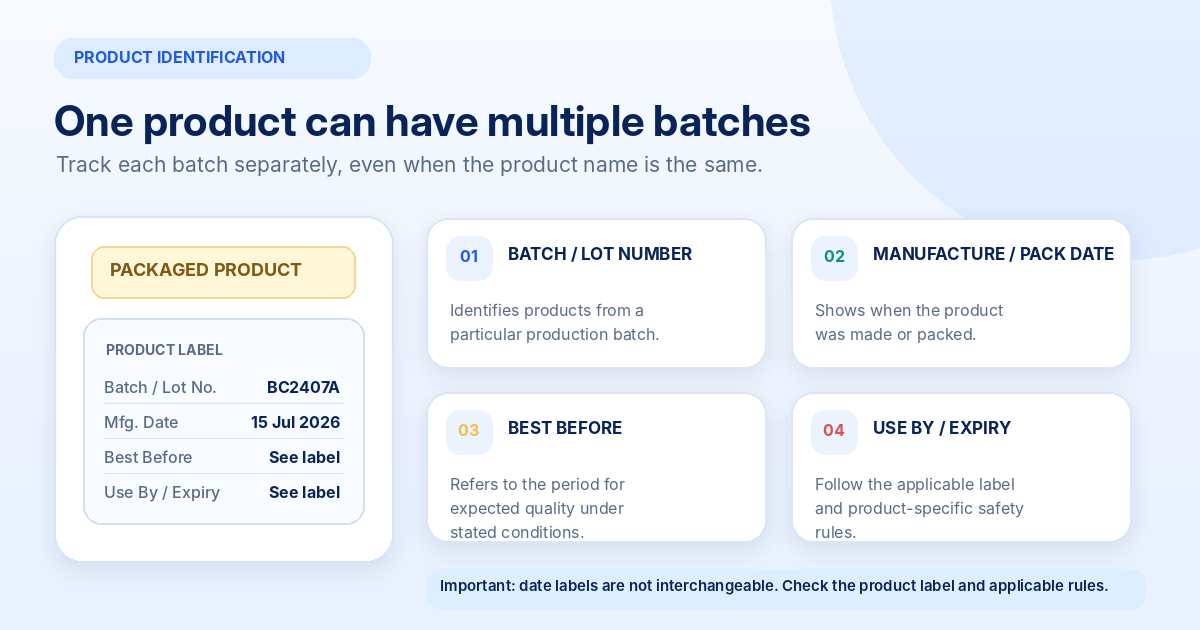
A batch number, also called a lot number or batch code, is an identification code assigned to a particular production or supply batch.
It helps identify and trace products that belong to the same batch.
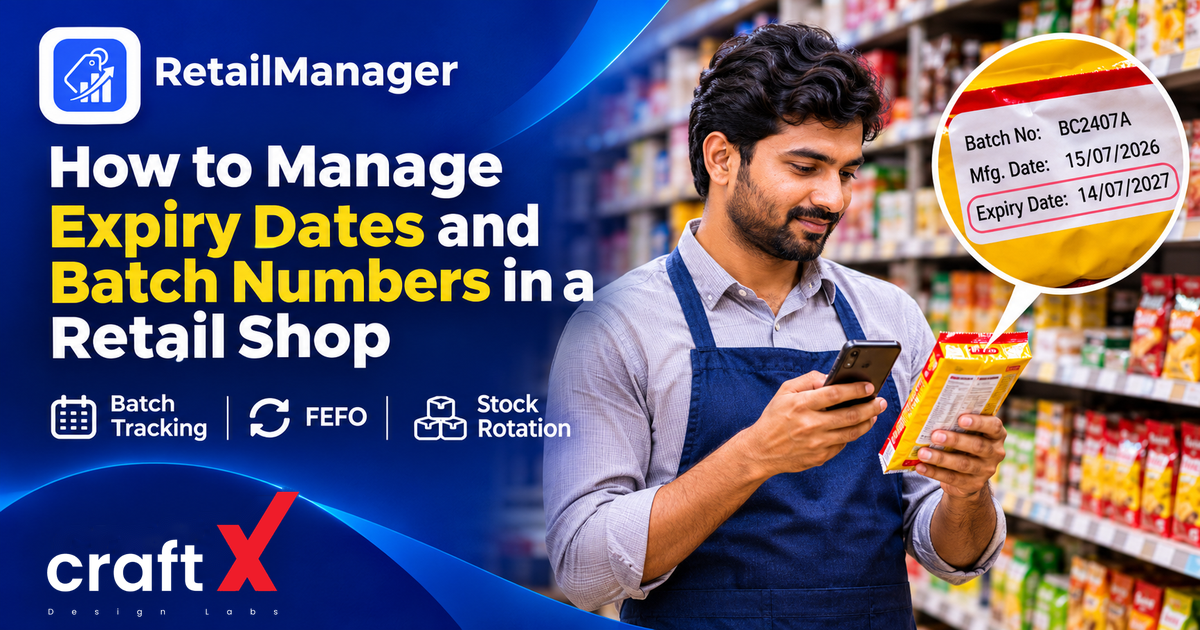
For example, a packaged product may display:
- Product name: Breakfast Cereal
- Batch number: BC2407A
- Manufacturing date: 15/07/2026
- Expiry or use-by date: 14/07/2027
When a shop receives another delivery of the same product with a different batch number, it should maintain a separate stock record for that batch.
Understand the different date labels
Product labels may contain different date-related terms.
Manufacturing date: The date on which the product was manufactured.
Packing date: The date on which the product was packed in its selling container.
Best Before: Indicates the period during which a food product is expected to retain its specified qualities under the stated storage conditions. Quality may decline after this date. It does not mean that every product automatically becomes unsafe on that date, but products must never be sold if they have become unsafe.
Use By or Expiry Date: Indicates the end of the specified period after which the food may no longer retain its expected safety and quality attributes. Food products past their applicable use-by or expiry date must not be sold or distributed for human consumption.
For packaged food, refer to the applicable Food Safety and Standards (Labelling and Display) Regulations and the product label. These regulations address batch or lot identification and date marking.
You can consult the official FSSAI Labelling and Display Regulations for the applicable requirements and amendments.
Different product categories may have separate requirements. Do not assume that the date-label rules for packaged food apply identically to medicines, cosmetics, supplements, or other regulated goods.
3. FIFO vs FEFO: Which Stock Rotation Method Should You Use?
Two commonly used stock rotation methods are FIFO and FEFO.
What is FIFO?
FIFO means First In, First Out.
Under this method, the products received first are generally sold first.
For example:
| Batch | Received date | Quantity |
|---|---|---|
| Batch A | 1 March | 30 |
| Batch B | 5 March | 40 |
Under FIFO, Batch A should normally be sold before Batch B because it arrived earlier.
FIFO is useful for general stock rotation, particularly when products have similar shelf-life characteristics.
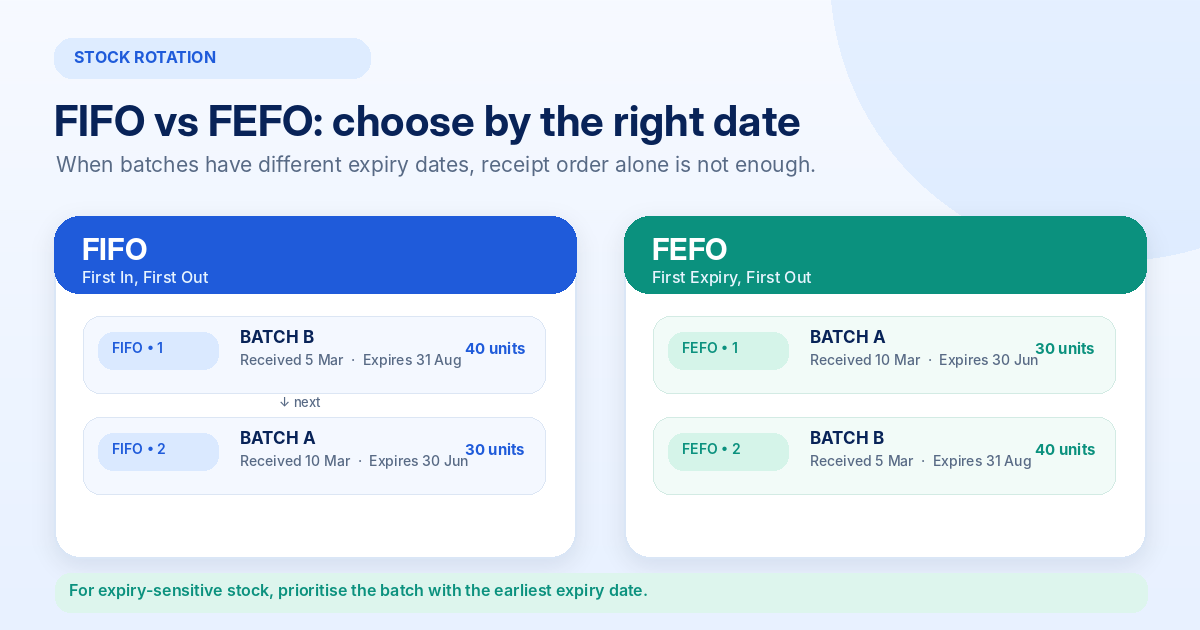
What is FEFO?
FEFO means First Expiry, First Out.
Under this method, the product batch with the earliest expiry date is prioritised for sale, regardless of when it arrived.
Consider this example:
| Batch | Received date | Expiry date | Quantity |
|---|---|---|---|
| Batch A | 10 March | 30 June | 30 |
| Batch B | 5 March | 31 August | 40 |
Although Batch B arrived earlier, Batch A has the earlier expiry date.
Therefore, Batch A should be prioritised under FEFO.
Which method is better?
For products with different expiry dates, FEFO is generally the more appropriate stock rotation method.
FIFO can still be useful for products with similar shelf-life characteristics or where expiry dates are not relevant.
For expiry-sensitive stock, use the actual labelled date and applicable storage instructions rather than relying only on the goods receipt date.
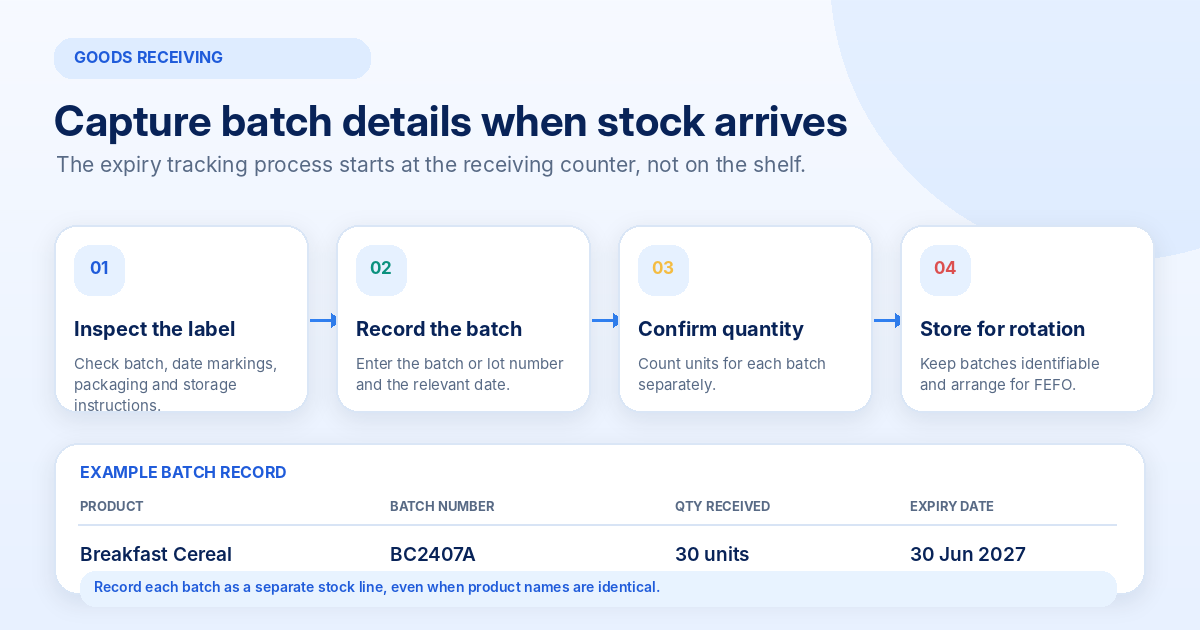
4. Record Batch Details When Receiving New Stock
Expiry tracking should start when products arrive at your shop.
Do not wait until the products are placed on shelves to record their details.
When receiving expiry-sensitive products, check:
- Product name, brand, and variant.
- Batch or lot number.
- Manufacturing or packing date, where applicable.
- Expiry, use-by, or best-before date, as applicable.
- Quantity received for each batch.
- Supplier name and purchase invoice reference.
- Physical condition and packaging.
- Required storage conditions.
Record each batch separately, even when the product name and selling price are identical.
Example of batch-wise stock recording
Suppose your shop receives two batches of the same packaged product.
| Product | Batch | Quantity | Expiry date |
|---|---|---|---|
| Breakfast Cereal | BC2407A | 30 | 30 June 2027 |
| Breakfast Cereal | BC2410B | 40 | 31 August 2027 |
Your total quantity is 70 packets, but the stock should remain identifiable as two separate batches.
This makes it easier to locate the correct products during stock rotation and expiry checks.
When checking supplier deliveries, also verify that the batches and quantities match the delivery documents. Read our guide on managing supplier purchases and purchase orders in a retail shop.
5. Arrange Products Using the FEFO Method
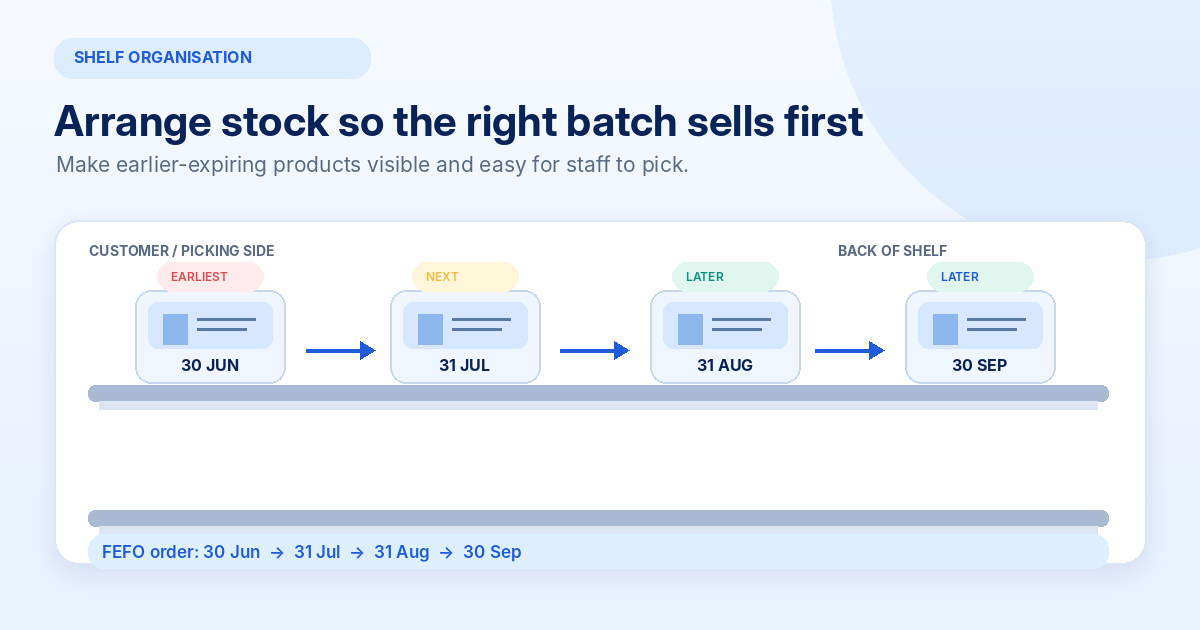
Recording expiry dates is useful only when employees follow the information while arranging products.
The shelf arrangement should make the earliest-expiring products easy to identify and access.
Follow these practices:
Place earlier-expiring batches in front: Arrange eligible products so that the batch with the earliest expiry is easier to pick first.
Place newer batches behind: New deliveries with later expiry dates can generally be positioned behind older batches when the product and storage requirements permit.
Keep batch details visible: Avoid covering, removing, or damaging the manufacturer's batch and date markings.
Separate different batches where necessary: If products have different expiry dates, keep them identifiable during storage and shelf replenishment.
Follow storage instructions: Temperature, humidity, light exposure, and handling can affect product condition and shelf life. Follow the manufacturer's instructions.
Do not simply move products around based on appearance. Employees should know which batch needs to be sold first.
6. Create a Near-Expiry Stock Monitoring System
A near-expiry monitoring system helps you identify products that need attention before their dates arrive.
You can start with a simple spreadsheet or register.
A useful expiry tracking register can contain:
| Field | Information to record |
|---|---|
| Product | Product name and variant |
| Batch number | Manufacturer's batch or lot code |
| Quantity | Remaining units in the batch |
| Expiry date | Date printed on the product |
| Supplier | Supplier or distributor name |
| Storage location | Shelf, rack, or storage area |
| Status | Normal, review, or remove from sale |
| Action | Rotate, contact supplier, or isolate |
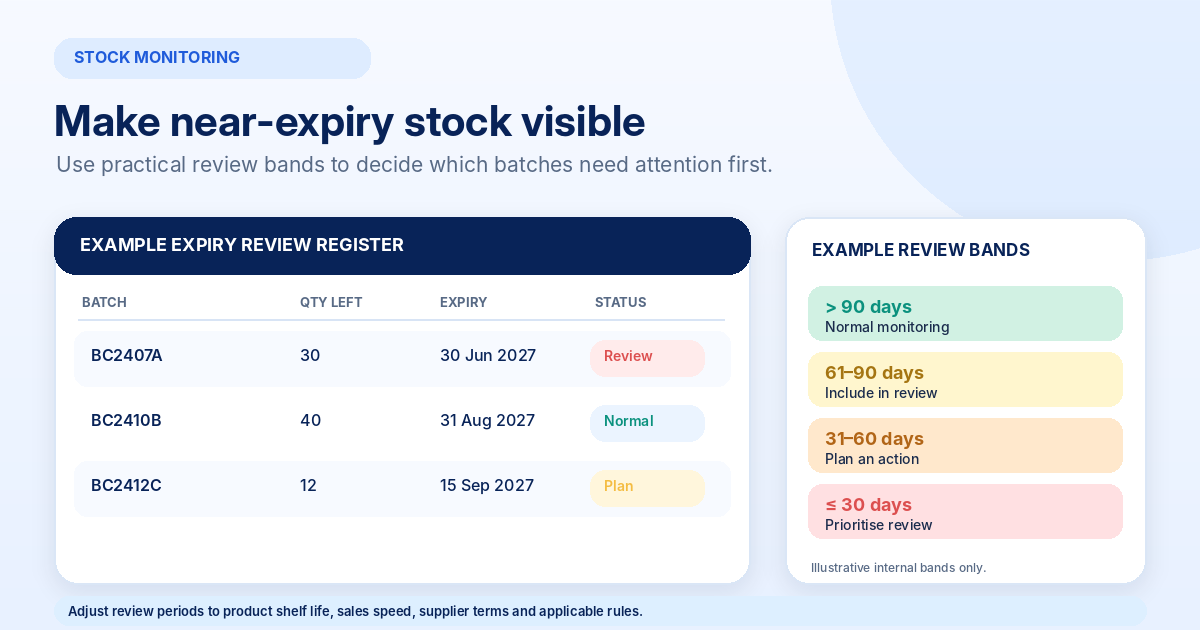
Create practical review periods
Your shop can use internal monitoring categories to organise upcoming expiry dates.
For example:
- More than 90 days remaining: Normal monitoring.
- 61–90 days remaining: Include in the upcoming review.
- 31–60 days remaining: Review expected sales and stock quantity.
- 30 days or fewer remaining: Prioritise inspection and an appropriate action.
- Expired or beyond the applicable use-by date: Remove from sale immediately.
These are illustrative business monitoring bands, not universal legal limits. Adjust them according to the product's shelf life, selling speed, supplier lead time, and applicable rules.
Products with very short shelf lives may need daily checks rather than monthly reviews.
7. What Should You Do With Products Approaching Expiry?
Finding products approaching expiry does not automatically mean that they should be discarded.
First, check their condition, remaining shelf life, expected demand, and supplier terms.
Depending on the product and applicable requirements, consider these actions:
Prioritise stock rotation
Move eligible earlier-expiring products to accessible selling positions and ensure employees follow FEFO.
Review future purchase quantities
Avoid ordering more of the same product when existing batches are unlikely to sell within their remaining shelf life.
Contact suppliers
Check whether the supplier agreement allows returns, replacements, or credit for eligible products approaching expiry.
Do not assume that every supplier accepts such returns. Confirm the terms before relying on them.
Review promotional opportunities
For products that remain legally saleable and suitable for sale, an appropriate promotion may help increase demand before the relevant date.
Check applicable pricing, labelling, advertising, and product-specific requirements before offering discounts.
Never use a discount to justify selling an expired or unsafe product.
8. How to Handle Expired and Damaged Products
Expired products should not remain mixed with normal saleable inventory.
Once an item reaches its applicable expiry or use-by date, or is identified as unsafe or damaged, take appropriate action.
A practical process includes:
- Identify the affected product and batch.
- Record the remaining quantity.
- Remove the products from normal selling shelves.
- Separate them from saleable inventory.
- Mark them clearly as not for sale.
- Contact the supplier if a return or replacement arrangement applies.
- Follow the appropriate disposal and documentation procedures.
Do not alter expiry dates, cover date markings, or transfer labels between products.
For pharmacies and other regulated businesses, follow the specific rules applicable to the product category. For example, the Drugs Rules, 1945 contain specific restrictions concerning the sale and stocking of expired drugs.
Expired medicines must be handled through the appropriate procedures. Do not place them back into normal saleable stock.
9. Build a Weekly Expiry Checking Routine
A consistent checking routine makes expiry management easier, even when the shop has many products.
You can divide responsibilities between the shop owner, manager, and employees.
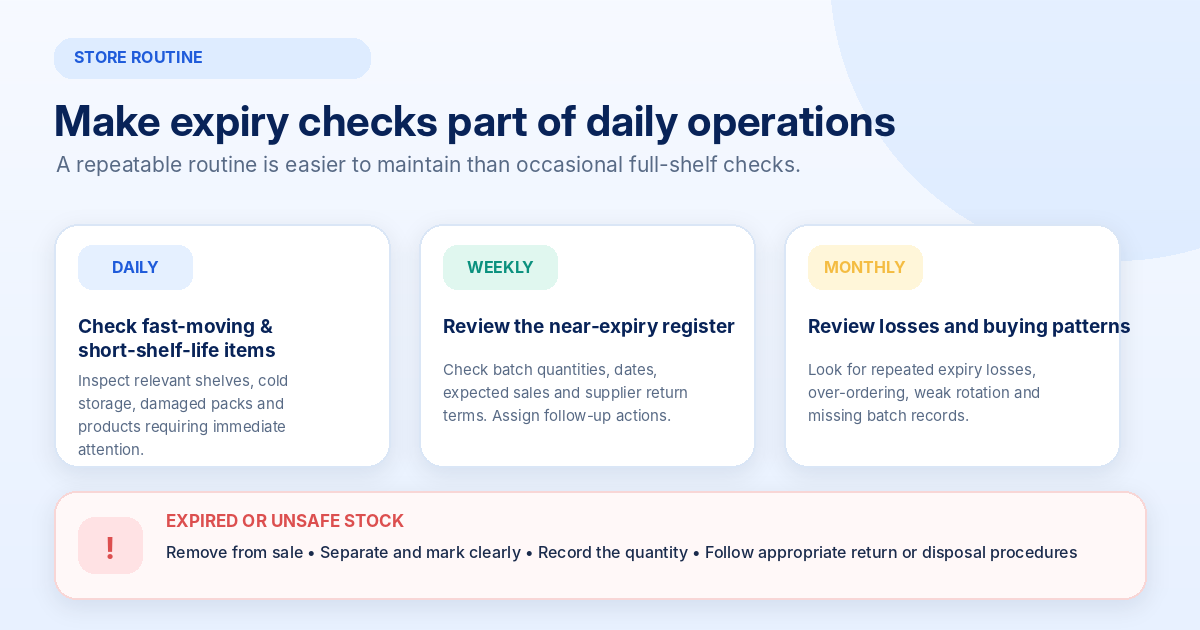
Daily checks
For short-shelf-life products, inspect relevant shelves and storage areas every day.
Check:
- Products with very limited remaining shelf life.
- Damaged or leaking packages.
- Refrigerated or temperature-sensitive stock.
- Products incorrectly placed during replenishment.
Weekly checks
Review the near-expiry register and identify batches requiring attention.
Check quantities, expiry dates, supplier return conditions, and planned actions.
Monthly checks
Review the overall expiry management process.
Look for recurring problems such as:
- Frequent expiry-related losses.
- Products purchased in excessive quantities.
- Employees not following FEFO.
- Missing batch records.
- Suppliers delivering products with insufficient remaining shelf life.
A monthly review helps identify where the process needs improvement.
10. Manual Register vs Spreadsheet vs Inventory Software
You do not need an expensive system to begin tracking expiry dates.
The right option depends on your product range, the number of batches received, and how frequently your employees need to review the information.
Manual register
A notebook can work for a small shop with a limited range of expiry-sensitive products.
However, manual registers require regular updating and make it harder to search for batches with upcoming dates.
Spreadsheet
A spreadsheet provides a more organised way to maintain batch information.
You can sort products by expiry date, filter particular suppliers, and highlight batches approaching their dates.
However, employees must enter the details correctly and update quantities after sales, returns, and adjustments.
Inventory management software
A suitable retail inventory system may help organise product records, purchase details, stock quantities, and reporting.
However, not every billing application supports batch-wise inventory or automated expiry alerts.
Before choosing software, check whether it supports:
- Separate stock quantities for different batches.
- Batch and expiry date recording during purchase entry.
- Searching or filtering stock by expiry date.
- Expiry alerts or near-expiry reports.
- Updating quantities when batches are sold or removed.
- Recording expired and damaged inventory separately.
RetailManager provides retail product, sales, purchase, and inventory workflows. Evaluate its current functionality before relying on it for specific batch-level tracking or automated expiry alerts.
The important point is to select a process that your shop employees can maintain consistently.
11. Common Expiry Management Mistakes to Avoid
Even shops that regularly inspect their products can make avoidable mistakes.
Recording only total product quantity: Keeping 100 units under one product record without identifying different batches can make expiry tracking difficult.
Following FIFO without checking expiry dates: The earliest-received batch may not have the earliest expiry date.
Ignoring products in storage: Expiry checks should include both display shelves and backroom inventory.
Not checking supplier deliveries: Products may arrive with damaged packaging, incorrect batch details, or less remaining shelf life than expected.
Using one review period for every product: Different products have different shelf lives and sales patterns.
Keeping expired goods with normal stock: Products that must not be sold should be physically separated and recorded appropriately.
Failing to train employees: A tracking system is not useful if employees do not understand batch identification and stock rotation.
Review these practices regularly and make expiry checks part of your normal store routine.
12. Frequently Asked Questions
What is expiry date management in retail?
Expiry date management is the process of recording product dates, tracking individual batches, rotating stock, identifying near-expiry products, and removing goods that must no longer be sold.
What is the difference between FIFO and FEFO?
FIFO means First In, First Out, where products received first are sold first. FEFO means First Expiry, First Out, where products with the earliest expiry dates are prioritised.
Why is batch number tracking important?
Batch numbers help identify and trace products received from different production batches. They are useful when investigating quality complaints, supplier issues, product withdrawals, and expiry-related problems.
How often should a retail shop check expiry dates?
Short-shelf-life products may need daily checks. Other products can be reviewed using a weekly or monthly schedule based on their shelf life, storage requirements, and sales rate.
Can expired products be sold at a discount?
Products that have passed an applicable use-by or expiry date, or are unsafe, must not be offered for sale. A discount does not change their safety or legal status.
Can small shops manage expiry dates using Excel?
Yes. A spreadsheet can track product names, batch numbers, quantities, suppliers, and expiry dates. It is suitable for many small shops when the information is updated consistently.
Does inventory software automatically track expiry dates?
Not always. Some applications support batch-level tracking and expiry alerts, while others record only total product quantities. Confirm the available features before choosing a system.
Conclusion
Expiry date management is an important part of maintaining product quality, protecting customers, and controlling avoidable inventory losses.
Start by recording batch details when goods arrive. Use FEFO for expiry-sensitive products, maintain a near-expiry register, arrange shelves carefully, and inspect products regularly.
Most importantly, make sure employees know how to identify different batches and handle products that should no longer be sold.
Whether you run a grocery store, pharmacy, supermarket, cosmetics shop, or another retail business, a consistent batch-wise tracking process can help you manage expiry-sensitive inventory more effectively.
For a broader understanding of retail inventory management, explore our other guides on physical stock verification and identifying and clearing dead stock.
- #Expiry Date Management
- #Batch Tracking
- #FEFO
- #Inventory Control
- #Retail Operations