Inventory & Purchasing
How to Identify and Clear Dead Stock in a Retail Shop
Find slow-moving stock, free up cash, plan clearance offers, and prevent overbuying with practical tips for small retail shops.

How to Identify and Clear Dead Stock in a Retail Shop
Dead stock in a retail shop can quietly tie up money that could otherwise be used to purchase products customers actually want. A product may remain on a shelf for months because demand was overestimated, a season has passed, a newer model has arrived, or customers are choosing a different option.
Whether you operate a kirana store, pharmacy, hardware shop, clothing store, fertilizer business, or mobile accessories shop, managing unsold inventory is an important part of running a healthy retail business.
The solution is not to discount every product that sells slowly. First, identify which products are not moving, check whether the records are accurate, and decide whether to improve their visibility, change the purchasing plan, return them to a supplier, or clear them through an appropriate offer.
In this guide, we will explain how to identify dead stock in a retail shop, reduce excess inventory, and prevent the same problem from happening again.
1. Understand the Difference Between Slow-Moving Stock and Dead Stock
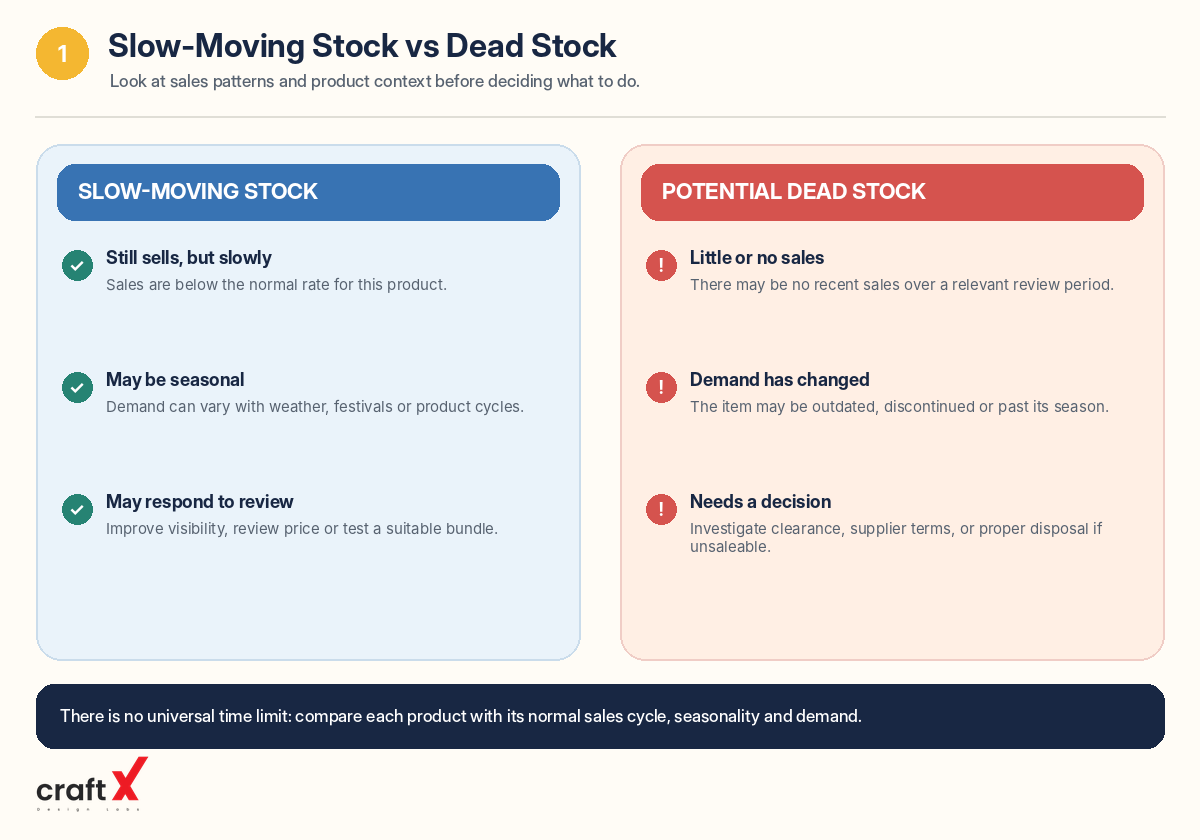
Slow-moving stock refers to products that still sell but move more slowly than expected or than the quantity held requires.
Dead stock generally refers to products that have stopped selling or are unlikely to sell through the shop's normal process without intervention. The exact definition depends on the product category and how long the shop normally takes to sell its inventory.
For example:
- A grocery shop may treat products with short shelf lives differently from durable household goods.
- A clothing shop may have unsold seasonal designs after the relevant season ends.
- A mobile accessories shop may still hold cases or accessories for older phone models that customers rarely request.
- A hardware shop may carry specialist components that sell infrequently but are still needed by customers.
Do not label a product as dead stock simply because it did not sell yesterday or last week. Some products naturally sell less frequently than others.
Instead, compare the product's sales history with its stock quantity, expected demand, seasonality, condition, and the normal selling cycle for that category.
2. Use Sales and Stock Records to Find Products That Are Not Moving
The first step in dead stock management is to identify products that deserve closer attention.
Start with your current product list and look for items with high quantities, low sales, or long gaps since their last sale.
For each product, review:
- Product name, code, brand, or variant
- Current recorded stock quantity
- Purchase cost per unit
- Last sale date, if available
- Units sold over a relevant recent period
- Product condition and expiry date, where applicable
- Whether the product is seasonal or linked to a particular model
For example, a shop may have 60 units of a product but sell only five units per month. That deserves a different purchasing decision from a product that sells 50 units each month.
Start by reviewing the products that represent the largest amount of money tied up in stock. This helps you prioritise rather than trying to clear every slow-moving product at once.
If your billing or inventory system provides sales and product reports, use them to identify low-sales items. If you maintain a paper register or spreadsheet, you can still create a simple list using purchase records and transaction history.
For guidance on choosing a record-keeping method, read manual stock register versus inventory software for small shops.
3. Calculate How Much Money Is Tied Up in Unsold Stock
Stock quantity alone does not show the full impact of slow-moving inventory. The product's cost and the number of units remaining also matter.
A simple calculation is:
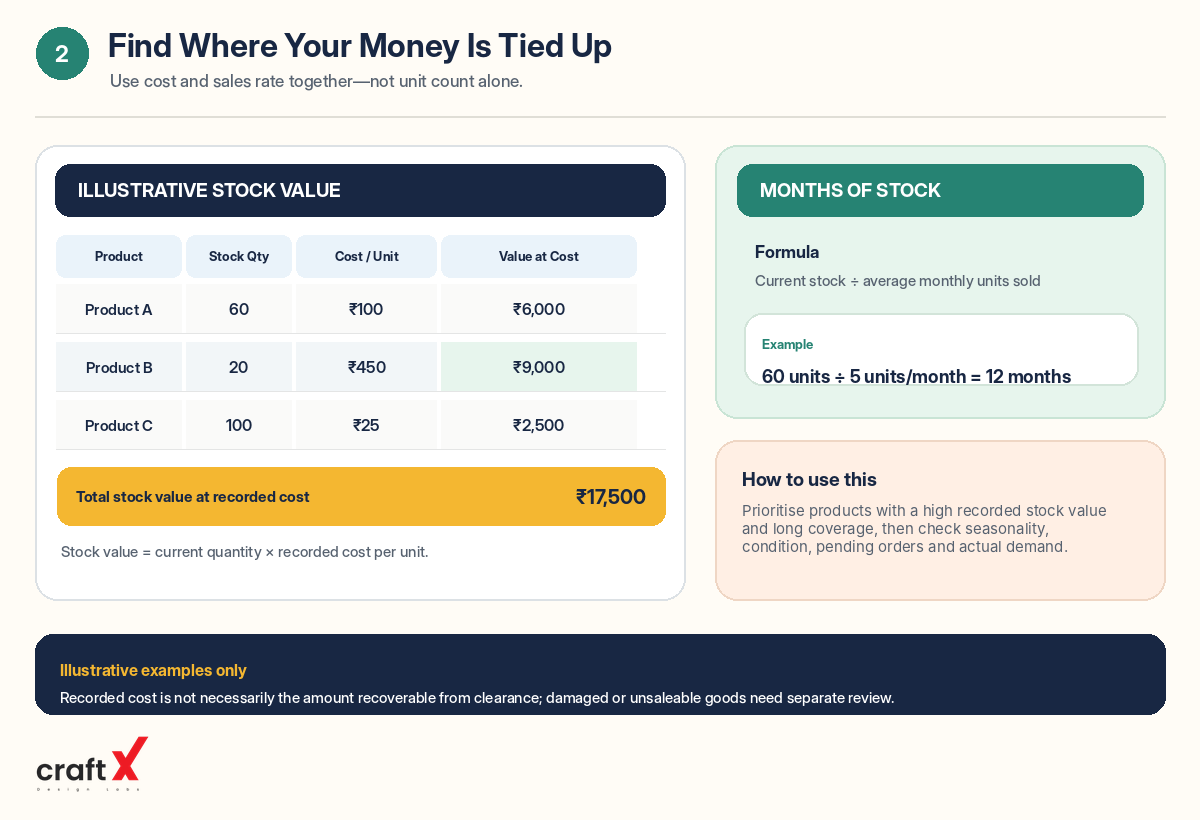
Stock value at recorded cost = Current quantity × Cost per unit
Consider this illustrative example:
| Product | Stock quantity | Cost per unit | Value at recorded cost |
|---|---|---|---|
| Product A | 60 | ₹100 | ₹6,000 |
| Product B | 20 | ₹450 | ₹9,000 |
| Product C | 100 | ₹25 | ₹2,500 |
| Total | 180 | — | ₹17,500 |
In this example, Product B has the highest stock value at recorded cost even though it has fewer units than Product C.
That does not automatically mean Product B is the worst item. You should also consider how quickly it sells, whether demand is seasonal, and whether customers still need it. However, it shows why it is useful to review inventory by value instead of looking only at quantity.
Stock value at recorded cost is a management measure, not necessarily the amount you could recover by selling the items today. Damaged, expired, outdated, or otherwise unsaleable goods may need separate treatment in your business records.
4. Estimate How Long Your Current Stock Will Take to Sell
One useful way to identify potential overstock is to compare stock on hand with the product's average sales rate.
Months of stock = Current stock quantity ÷ Average monthly units sold
For example, if you have 60 units of a product and sell around five units per month:
Months of stock = 60 ÷ 5 = 12 months
This means the current quantity represents approximately 12 months of sales at that average rate, assuming demand remains similar and no other stock movements occur.
For many products, that may be more inventory than the shop needs. However, the appropriate level depends on supplier lead times, minimum order quantities, seasonality, and how important it is to keep the product available.
If a product has recorded zero sales during the chosen period, the calculation cannot provide a meaningful number of months of stock. Flag it separately and investigate why it has not sold.
Do not use one fixed time limit for every product. A seasonal item, a fast-moving grocery product, and a specialist hardware component all have different sales patterns.
5. Physically Check the Products Before Taking Action
Before launching a clearance offer or changing your records, check that the product really is slow-moving or unsaleable.
A mismatch between the shelf and the stock system can make an item appear available when it is missing, damaged, returned, or incorrectly recorded.
Check the following:
- Confirm that the products physically exist in the shop or storage area.
- Check whether the stock record uses the correct product variant and unit.
- Look for damaged packaging, missing accessories, or other condition issues.
- Check expiry dates and other relevant product information.
- Identify discontinued models or products that no longer match customer demand.
- Verify whether recent purchases, sales, returns, or stock adjustments were recorded correctly.
Separate products into practical categories, such as saleable slow-moving stock, seasonal stock, damaged goods, expired goods, and items requiring further investigation.
This distinction matters because the right response differs by category. A saleable product may be suitable for a promotion, while an expired or unsafe product must not be offered to customers as normal saleable inventory.
If you find quantity differences, investigate and record the reason before making an adjustment. Do not treat every shortage as an ordinary sale or every damaged item as a discount opportunity.
6. Choose the Right Way to Clear Slow-Moving Stock
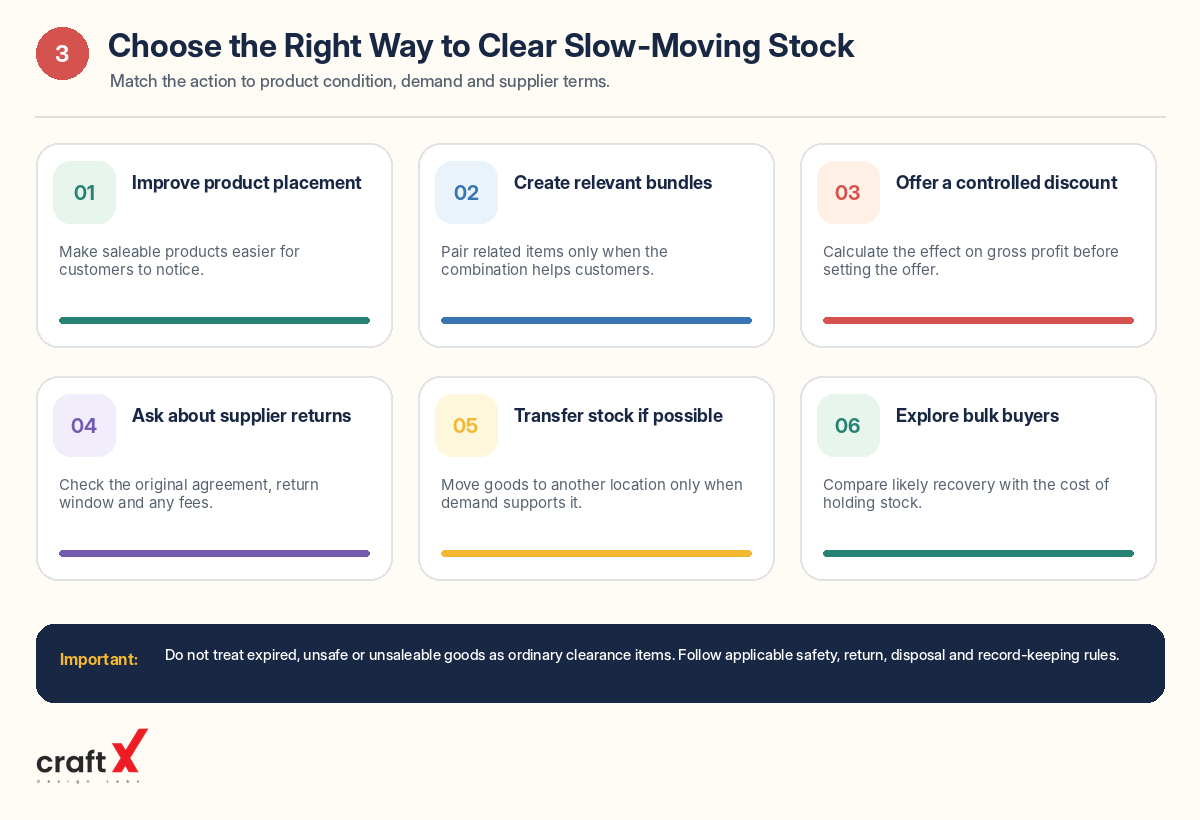
Once you understand why an item is not moving, select an appropriate action. You do not need to apply the same solution to every product.
Improve product placement
Sometimes products sell slowly because customers do not notice them or cannot easily find them.
Consider making suitable changes to displays, shelf organisation, product information, or signage. Move relevant products to a more visible location where appropriate, without making the shop difficult to navigate.
This may help when the product is still useful, correctly priced, and relevant to your customers.
Create a relevant product bundle
You may be able to combine a slow-moving product with a related item that customers commonly purchase together.
For example, a hardware shop might bundle compatible accessories with a suitable tool. A mobile accessories shop might offer a compatible case and screen protector together.
The bundle should make sense for the customer. Check the cost and selling price of the combined offer before promoting it.
Consider a controlled discount
A clearance discount may help move saleable stock, especially when a season is ending or demand is declining.
Before setting the offer, calculate what you will receive and what costs remain. A lower selling price can reduce gross profit significantly, so do not decide the discount based only on the original price or the number of units you hope to sell.
Make the offer clear, time-bound where appropriate, and consistent with the requirements that apply to the product. For packaged goods, check applicable MRP and other pricing rules.
Ask the supplier about returns or exchanges
Depending on the original agreement, a supplier may allow eligible goods to be returned or exchanged for products that sell more consistently.
Check the agreed terms, product condition, return window, restocking fees, and any other conditions before relying on this option.
Do not assume that every supplier accepts unsold inventory. Keep the agreement and any resulting credit note or adjustment in your records.
Transfer stock where it makes sense
If your business operates more than one shop or sales location, a product that moves slowly in one location may sell better in another.
Check demand, transfer costs, product condition, and the receiving location's current stock before moving the goods.
This option is relevant only where your business has suitable alternative locations.
Explore bulk or business buyers
Some saleable goods may be suitable for sale in a larger lot to another retailer, reseller, or business buyer.
Confirm the buyer's requirements, the quantity and condition of the goods, the price, the payment terms, and the documentation required for the transaction.
Compare the likely recovery with the alternative of holding the stock longer. A bulk sale may recover less per unit but can release cash and storage space sooner.
Handle unsaleable goods appropriately
Expired, unsafe, damaged, or legally restricted products require different handling from normal slow-moving inventory. Follow the applicable safety, return, disposal, and record-keeping procedures for the product category.
If you plan to donate, dispose of, or write off goods, document the decision and consult your accountant about the appropriate accounting and tax treatment.
7. Check the Financial Impact Before Discounting
Clearing old inventory can help free up space and working capital, but a clearance price still needs to be evaluated carefully.
Suppose a product has a recorded cost of ₹100 per unit and a regular selling price of ₹150.
If you sell it at ₹120, the difference between selling price and product cost is ₹20 per unit before other expenses and applicable tax effects.
If you sell it at ₹90, the selling price is ₹10 below the recorded product cost.
These examples do not mean that a loss-making sale is always wrong. In some circumstances, clearing an item may be preferable to holding it until it loses more value. But the decision should be deliberate.
Consider:
- How much longer the stock is likely to remain unsold
- Whether the product may expire, deteriorate, or become outdated
- The amount of cash that could be released
- Whether the proposed price covers the relevant costs
- Whether the same money would be more useful for purchasing products that sell reliably
- Any legal, contractual, or tax requirements that apply
For a broader explanation of the relationship between selling price and profit, read how to calculate daily sales and profit in a retail shop.
8. Prevent Dead Stock When Placing Future Orders
Clearing slow-moving inventory helps address the current problem. Preventing excess stock from building up again is just as important.
Use these practices when planning purchases.
Order based on actual sales. Review how frequently a product sells rather than relying only on an estimate or a supplier's recommendation.
Start with sensible quantities. When introducing a product with uncertain demand, consider a smaller initial order if the supplier's terms allow it.
Review seasonal demand. Plan purchases for seasonal products early enough to meet demand, but avoid buying so much that most of the stock remains after the season ends.
Check pending orders before reordering. Include stock already ordered but not yet received when deciding how much more to buy.
Be cautious with bulk discounts. A lower unit price may not compensate for the cost and risk of holding products that your shop cannot sell quickly enough.
Review variants separately. Some sizes, colours, brands, or models may sell well while others remain unsold. Do not assume that demand for one variant proves demand for every variant.
Review supplier terms. Understand minimum order quantities, delivery arrangements, and eligible return or exchange conditions before committing to a large purchase.
These habits work alongside your normal stock-replenishment process. Read how to prevent stockouts in a retail shop for guidance on balancing product availability against excess inventory.
9. Maintain a Simple Dead Stock Review List
A dedicated list helps you assign responsibility and follow up on products that need action.
You can use a spreadsheet, notebook, or inventory report containing the following information:
| Field | What to record |
|---|---|
| Product | Name, code, brand, or variant |
| Quantity | Current recorded stock |
| Unit cost | Recorded purchase cost per unit |
| Stock value | Quantity multiplied by unit cost |
| Last sale | Most recent sale date, if available |
| Reason | Low demand, seasonal, outdated, damaged, or another cause |
| Planned action | Review display, check return terms, promotion, or other action |
| Review date | When you will check the result |
Review the list periodically and update it when sales, returns, transfers, or other stock movements occur.
Start by reviewing high-value items and products with a long gap since their last sale. Once an action is complete, record the result so that you can learn which approaches work best for your shop.
10. How Digital Records Can Help Identify Slow-Moving Products
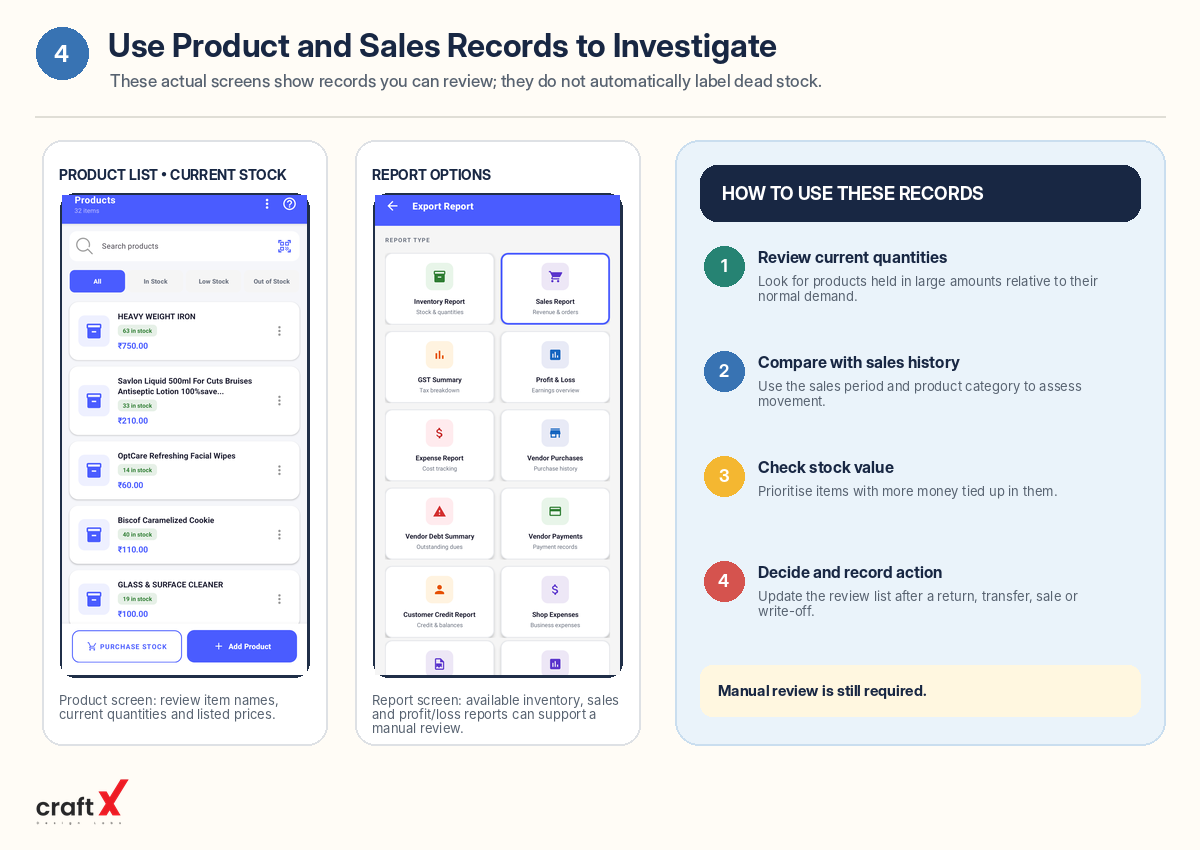
Paper records can be sufficient for a small shop with a limited number of products. As the range grows, it becomes harder to remember which products sell regularly and which have remained untouched for weeks or months.
A suitable retail-management system may help you review product quantities, sales history, purchase records, and reports. The available features vary between applications, so check whether your current system can identify last-sale dates or generate a slow-moving inventory report before relying on it for that purpose.
If those reports are not available, a spreadsheet using periodic sales exports or manual records may still help you build a useful review list.
RetailManager is one option to evaluate for product records and reporting. Explore RetailManager on Google Play and confirm that its current features meet your needs before relying on it for any specific dead-stock alert or inventory-ageing workflow.
Frequently Asked Questions
What is dead stock in a retail shop?
Dead stock is inventory that has stopped selling through the shop's normal sales process or is unlikely to sell without intervention. It can include outdated models, unsold seasonal goods, or products that no longer match customer demand.
How long should a product remain unsold before it is considered dead stock?
There is no universal time limit. The appropriate review period depends on the product's normal sales rate, seasonality, shelf life, supplier lead time, and the kind of shop you operate. Compare products against their usual selling cycles rather than applying one fixed rule to every item.
Should I discount all slow-moving stock?
No. First identify why the product is not selling. Better placement, a supplier exchange, a suitable bundle, or a targeted promotion may be more appropriate. Always check product condition and calculate the financial impact before discounting.
What is the difference between dead stock and stockouts?
Dead stock refers to products that remain unsold for too long, while a stockout occurs when a customer wants a product but the shop does not have it available. Good inventory management seeks to reduce both problems by matching purchasing decisions to realistic demand.
Are stock records required under GST in India?
The Central Goods and Services Tax Rules include stock-account requirements for registered persons within the scope of Rule 56. The requirements cover relevant stock movements and certain losses, write-offs, and disposals. Review the official CBIC accounts and records rules and consult your accountant about the requirements that apply to your business.
Conclusion
Dead stock can occupy valuable shelf space and tie up money that could be used for products customers actually want. The first step is to identify slow-moving items using stock quantities, sales history, product condition, and recorded cost.
Next, verify the physical inventory, understand why each product is not moving, and choose an appropriate action. Depending on the circumstances, that may mean improving the display, arranging a supplier exchange, offering a controlled discount, transferring saleable goods, or handling unsaleable items through the appropriate process.
Finally, review your purchasing decisions regularly. Ordering more carefully, considering seasonal demand, and tracking product performance can help reduce excess inventory over time.
Whether you run a grocery shop, pharmacy, hardware store, clothing business, fertilizer shop, or mobile accessories store, a consistent dead-stock review process can help you make more informed purchasing decisions and manage your working capital more carefully.
- #Dead Stock
- #Slow-Moving Inventory
- #Stock Management
- #Inventory Control
- #Retail Tips