Billing & Payments
UPI Payment Reconciliation for Retail Shops: A Practical Guide
A practical guide to UPI payment checks, bank matching, pending transactions, and daily payment reconciliation for small retail shops.
UPI Payment Reconciliation for Retail Shops: A Practical Guide
UPI payment reconciliation is an important part of managing daily collections in a retail shop. Customers may pay through UPI, cash, cards, or other methods, but the shop owner must make sure that every transaction is recorded correctly and that the expected money is received.
A customer may show a successful payment screen, but the shop's bank account or merchant payment dashboard may not immediately reflect the transaction. There may also be pending payments, duplicate entries, incorrect amounts, or differences between billing records and bank settlements.
Whether you run a kirana store, pharmacy, hardware shop, clothing store, fertilizer business, or mobile accessories shop, a consistent payment reconciliation process helps you identify these differences and maintain accurate financial records.
In this guide, we will explain how to verify UPI payments, reconcile cash and card collections, handle failed or pending transactions, and close your shop's daily payment records.
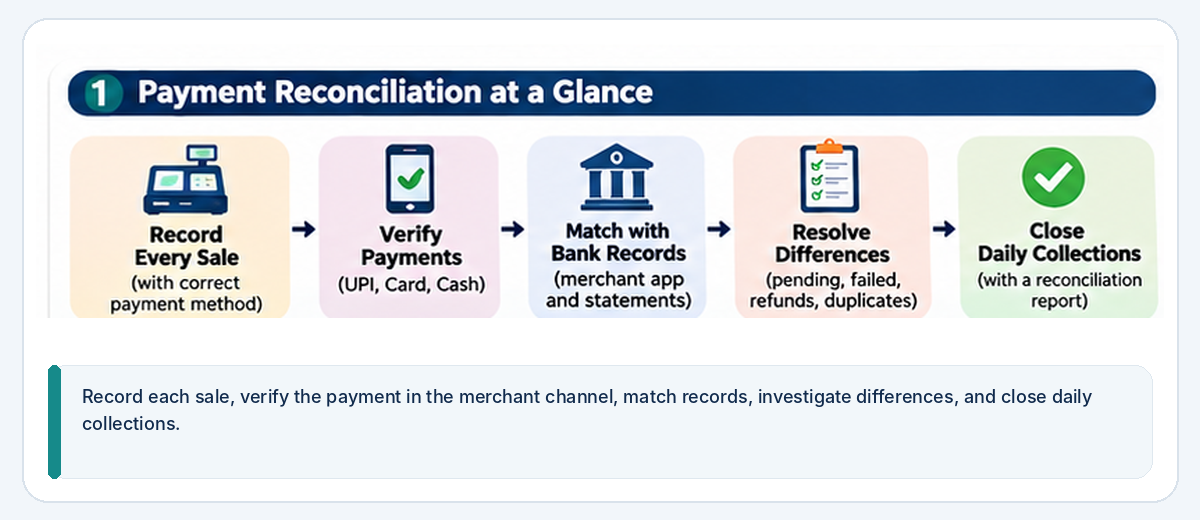
1. Understand What Payment Reconciliation Means
Payment reconciliation means comparing your shop's sales and payment records with the actual money received through different payment methods.
For example, your billing system may show that customers paid ₹25,000 during the day. But that amount may include cash, UPI, card payments, and credit sales.
You need to verify each payment category separately.
Consider these payment methods:
Cash: Money physically collected at the billing counter.
UPI: Payments made through a merchant QR code, UPI ID, or another supported merchant payment method.
Debit and credit cards: Payments accepted through a point-of-sale terminal or payment provider.
Bank transfers: Direct payments received into the business bank account.
Credit sales: Sales for which the customer has not yet paid.
A sale recorded in your billing system does not always mean that the full amount has already been collected. Similarly, a payment received today may relate to a credit sale made earlier.
Keep sales, payment collections, and outstanding balances separate.
For a broader explanation, read our article on how to calculate daily sales and profit in a retail shop.
2. Record Every Sale With the Correct Payment Method
The first step towards accurate reconciliation is recording each transaction correctly when the customer makes a purchase.
For every sale, maintain the relevant details:
- Invoice or transaction number
- Transaction date and time
- Products and quantities sold
- Total bill amount
- Discount, if applicable
- Payment method
- Payment status
- Payment reference number, where available
For example, if a customer purchases goods worth ₹1,500 and pays ₹1,000 through UPI and ₹500 in cash, your records should show both payment methods against the same sale.
Do not record the entire ₹1,500 as UPI or cash.
A simple example:
| Payment method | Amount |
|---|---|
| UPI | ₹1,000 |
| Cash | ₹500 |
| Total bill | ₹1,500 |
This makes it easier to compare the billing record with the actual UPI collection and cash drawer.
If a payment is pending or unconfirmed, do not mark it as successfully collected simply because the customer has initiated the payment.
Use a clear status such as pending, successful, failed, or refunded, based on the information available in your payment system.
3. Verify UPI Payments Before Confirming a Sale
UPI makes payments convenient for both retailers and customers. However, shop owners should verify the transaction rather than relying only on what appears on a customer's phone.
A practical verification process includes the following steps.
Step 1: Confirm the amount
Check that the amount displayed in your merchant payment system matches the customer's bill.
For example, if the bill is ₹850, make sure the payment confirmation also shows ₹850.
Step 2: Check the transaction status
Look for a successful transaction confirmation in your own merchant UPI application, bank application, payment terminal, or acquiring-provider dashboard.
A screenshot shared by a customer is not sufficient proof that the money has reached your business account.
Step 3: Verify the transaction reference
Where available, record the UPI transaction ID or reference number.
This helps you identify a payment later when investigating a complaint or matching transactions with bank records.
Step 4: Match the payment with the bill
Once the payment is confirmed, record the correct amount and payment method against the original invoice.
Step 5: Provide the receipt
Complete the billing process and provide the customer with an appropriate bill or receipt.
Important payment safety practices
- Never ask customers to reveal their UPI PIN.
- Never request OTPs or banking passwords.
- Do not treat a payment screenshot as final confirmation.
- Do not ask customers to install unfamiliar applications to verify a payment.
- Verify the transaction using your own merchant or bank records.
- Use a properly configured merchant QR or payment arrangement.
The National Payments Corporation of India (NPCI) explains that merchants can accept UPI through an acquiring bank, which provides the relevant merchant infrastructure. Its official UPI FAQs also explain how merchants can check transaction grievances with their acquiring banks.
4. Understand Pending, Failed, and Successful UPI Transactions
Not every payment attempt receives an immediate confirmation.
A customer may see a pending status, receive a debit notification, or experience a network delay while completing a payment.
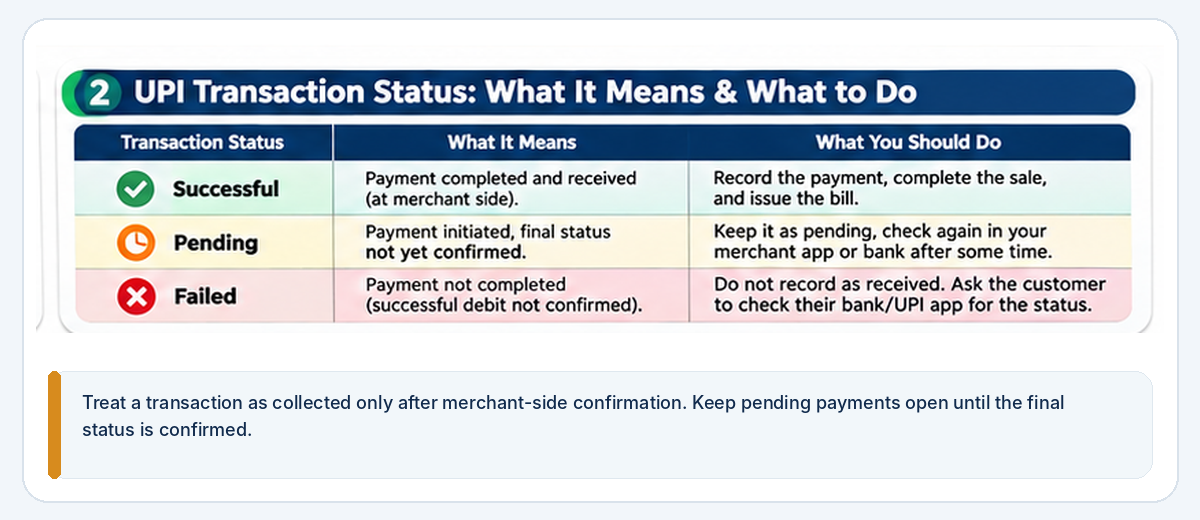
It is important to understand the difference between transaction statuses.
Successful payment
The merchant's payment system confirms that the transaction was successful.
Record the payment against the bill and complete the sale.
Pending payment
The transaction has been initiated, but its final status is not confirmed.
Do not immediately mark it as received. Check your merchant payment application, bank records, and available transaction-status information.
If the status remains unclear, record the transaction as pending and retain the reference number.
Failed payment
The payment system confirms that the transaction did not complete successfully.
Check whether the customer's bank account was debited and whether any reversal has occurred.
Do not assume that a customer's money has been refunded simply because the transaction screen shows failed.
What should you do if the customer says money was deducted?
Consider this situation:
A customer purchases goods worth ₹2,000 and initiates a UPI payment. The customer's bank account shows a debit, but your merchant system does not show a successful payment.
Follow this process:
- Check your merchant payment dashboard and bank records.
- Ask for the transaction reference, if needed.
- Check the transaction status through the available payment channels.
- Keep the transaction marked as pending until it is resolved.
- Avoid collecting a second payment without first checking the original transaction, as this could lead to duplicate payment.
- Contact your acquiring bank or payment provider when the merchant-side status remains unresolved.
For an unresolved customer-side debit, the customer can also raise a complaint through their UPI application or bank.
RBI's failed merchant-payment reversal framework
The Reserve Bank of India's published framework distinguishes between different UPI failure situations.
For a domestic UPI merchant payment where the customer's account is debited but transaction confirmation is not received at the merchant location, the framework specifies auto-reversal within T+5 days. It also provides for compensation of ₹100 per day for delays beyond that period, subject to the framework's conditions.
This is different from a person-to-person UPI transfer where the beneficiary account is not credited, which has a separate T+1-day reversal timeline.
You can read the RBI's official turnaround-time and compensation framework for the applicable details.
The merchant should still follow up through the acquiring bank or payment provider rather than treating an unconfirmed transaction as collected money.
5. Reconcile UPI Collections With Your Bank Records
At the end of the day, compare the successful UPI payments recorded in your billing system with the merchant payment records and relevant bank credits.
Start by reviewing your UPI transaction history.
Check:
- Total successful UPI payments
- Number of completed transactions
- Individual transaction amounts
- Transaction reference numbers
- Failed and pending payments
- Refunds and reversals
- Actual credits in the relevant merchant bank account
For example:
| Description | Amount |
|---|---|
| UPI sales recorded in billing | ₹18,500 |
| Successful transactions confirmed | ₹18,500 |
| Difference | ₹0 |
In this example, the billing total matches the successful UPI transactions.
If the billing system shows ₹18,500 but the merchant records show only ₹17,500, investigate the ₹1,000 difference.
Possible explanations include:
- An unconfirmed payment
- A transaction recorded twice
- A payment assigned to the wrong invoice
- A refund or reversal
- A transaction made through a different merchant account
- A reporting or timing difference
Do not create an adjustment simply to force both records to match. Find the reason and record the correction with an explanation.
Also distinguish between payment confirmation and bank settlement. Depending on the acquiring arrangement and payment provider, transaction confirmations and settlement entries may appear in different reports or at different times.
6. Reconcile Cash Collections Separately
Cash reconciliation is just as important as UPI reconciliation.
Even if most customers use digital payments, your shop may still receive cash throughout the day.
Before opening, record the cash float placed in the drawer.
At closing, count the actual cash and compare it with the expected balance.
A simple formula is:
Expected closing cash = Opening cash float + Cash sales + Other cash received − Cash refunds − Cash expenses − Other cash payouts
For example:
| Description | Amount |
|---|---|
| Opening cash float | ₹2,000 |
| Cash sales | ₹12,000 |
| Cash received from other collections | ₹1,000 |
| Cash refunds | ₹500 |
| Cash expenses and payouts | ₹300 |
| Expected closing cash | ₹14,200 |
Suppose the physical cash count is ₹14,000.
The difference is:
₹14,200 − ₹14,000 = ₹200 shortage
Do not immediately assume that an employee has taken the money or that a sale is missing.
Check:
- Whether a transaction was recorded with the wrong payment method
- Whether a cash expense was not entered
- Whether a refund was recorded incorrectly
- Whether opening cash was counted correctly
- Whether a cash collection was missed
- Whether cash was transferred from the drawer without a record
Record any unresolved difference and investigate it according to your shop's procedures.
7. Check Card Payments and Bank Settlements
If your shop accepts debit or credit cards, compare your billing records with the point-of-sale terminal report and payment-provider settlement records.
Card payment reconciliation may involve more than checking the transaction amount shown on the terminal.
Consider these details:
- Total successful card transactions
- Individual transaction references
- Reversed or voided transactions
- Refunds
- Merchant fees or other applicable charges
- Settlement amounts
- Payments that have not yet reached the bank account
For example, your billing system may show ₹7,000 in successful card payments. The POS terminal report also shows ₹7,000, but the bank settlement appears later or reflects applicable processing charges.
This may be a normal settlement timing or fee difference rather than a missing sale.
Maintain separate records for the gross customer payment and any charges deducted by the payment provider.
If a settlement is lower than expected, compare the settlement statement, fee details, refunds, and transaction references before recording an adjustment.
Do not treat every difference between gross card collections and bank credits as a sales loss.
8. Prepare a Daily Payment Reconciliation Report
A daily payment reconciliation report brings the different payment methods together.
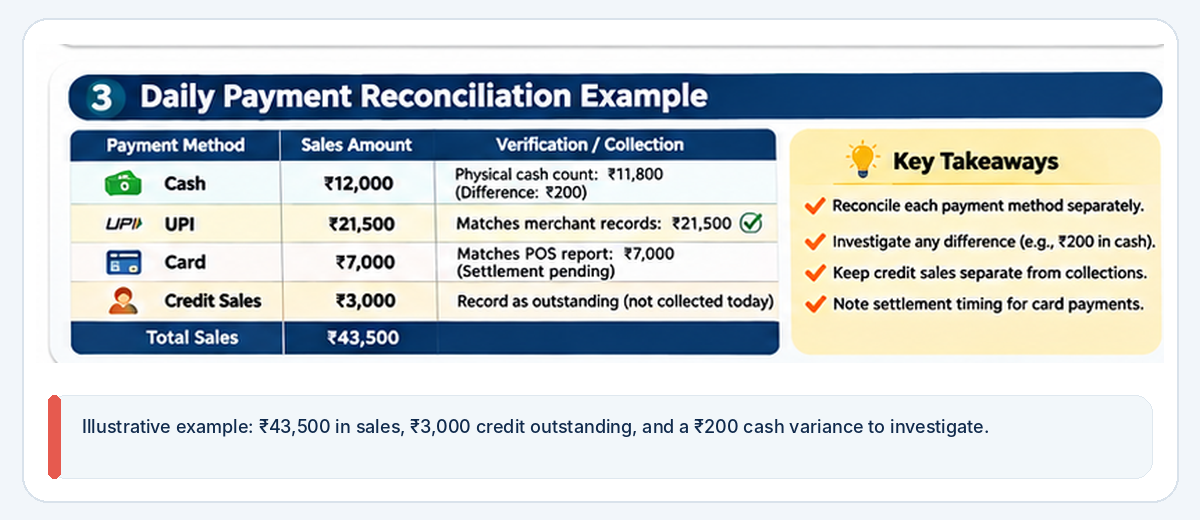
Consider this illustrative example of a shop's sales for one day.
Sales recorded
| Payment method | Sales amount |
|---|---|
| Cash | ₹12,000 |
| UPI | ₹21,500 |
| Card | ₹7,000 |
| Credit sales | ₹3,000 |
| Total sales | ₹43,500 |
The shop has recorded ₹43,500 in sales.
However, ₹3,000 was sold on credit, so it should be recorded as a customer receivable rather than a payment collected today.
Payment verification
| Payment method | Expected amount | Verification |
|---|---|---|
| Cash | ₹12,000 | Physical cash count needed |
| UPI | ₹21,500 | Match merchant transactions |
| Card | ₹7,000 | Match POS report and settlement |
| Credit sales | ₹3,000 | Record as outstanding balance |
Suppose the cash count is ₹11,800. This creates a ₹200 cash difference that requires investigation.
Suppose UPI transactions match at ₹21,500, and card transactions match the POS report at ₹7,000, but the bank settlement is still pending according to the payment provider's normal process.
In that case:
- UPI is reconciled.
- Card transactions are confirmed but settlement is pending.
- Cash has a ₹200 difference to investigate.
- Credit sales remain outstanding until customers pay.
This is more informative than simply looking at the day's total sales.
9. Handle Refunds, Reversals, and Duplicate Payments Properly
Refunds and reversals should be recorded separately from ordinary sales and collections.
For example, a customer may return a product and receive a refund through the original payment method.
Record the following:
- Original invoice number
- Original transaction reference
- Refund date
- Refund amount
- Payment method used for the refund
- Refund reference, where available
- Reason for the refund
If a UPI transaction is reversed after a failed payment, do not record it as a customer refund unless an actual refund was initiated by the merchant.
These are different events.
A payment reversal corrects an unsuccessful or failed transaction. A merchant refund is a separate payment made back to the customer after an eligible return or other approved adjustment.
Also watch for duplicate payments.
If a customer accidentally pays twice for the same bill, verify both transactions in your merchant records and follow the appropriate refund process for the duplicate amount.
For more guidance, see our guide on handling customer returns and exchanges in a retail shop.
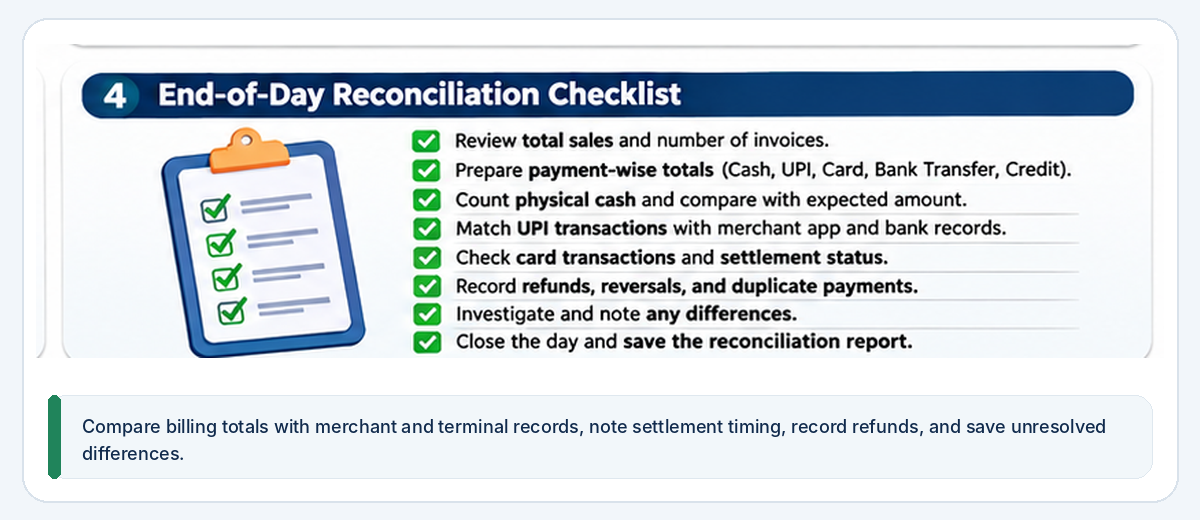
10. Follow a Simple End-of-Day Reconciliation Routine
You do not need to spend hours reviewing every transaction manually.
Use a consistent closing routine so important payment differences are identified early.
Step 1: Review sales totals
Check the total sales and number of invoices recorded during the day.
Step 2: Separate payment methods
Prepare totals for cash, UPI, cards, bank transfers, and credit sales.
Step 3: Count physical cash
Compare the actual cash count with the expected closing cash balance.
Step 4: Verify UPI transactions
Match successful UPI payment entries with the merchant transaction history and relevant bank records.
Step 5: Review card payments
Compare the POS transaction report with billing records and identify settlements that are still pending.
Step 6: Record refunds and reversals
Make sure refunds, failed transactions, and reversals are not mixed with normal sales.
Step 7: Investigate differences
Record any mismatch, the amount involved, the transaction reference, and the next action required.
Step 8: Close the day's records
Once the checks are complete, save or retain the reconciliation summary according to your business record-keeping procedure.
A consistent process makes it easier to identify repeated issues and prepare for the next working day.
11. Protect Your Shop Against Common Payment Mistakes
Payment problems can occur because of employee mistakes, customer misunderstandings, network issues, or incorrect transaction records.
Use these precautions:
Verify payment confirmation: Do not treat customer screenshots as final proof of receipt.
Use a designated merchant account: Keep business payment collections separate from personal transactions where practical.
Display the correct QR code: Ensure your displayed merchant QR belongs to the intended business account.
Check amounts before confirming: Make sure the payment amount matches the bill.
Restrict access: Avoid sharing sensitive banking credentials or merchant account passwords among employees.
Record refunds properly: Use the authorised refund procedure and retain the reference.
Review unusual transactions: Investigate unexplained differences, repeated payment attempts, or duplicate collections.
Train employees: Explain what counts as successful payment confirmation and how to handle pending transactions.
Never ask customers to disclose their UPI PIN, OTP, or banking password. Payment credentials should remain private.
12. Use Billing Software to Make Payment Reconciliation Easier
When your shop processes only a few transactions, a notebook or spreadsheet may be enough.
As transaction volumes increase, manually comparing invoices, cash records, UPI histories, card statements, and bank credits can become time-consuming.
A suitable billing or retail-management system may help you:
- Record sales against the correct payment method
- Maintain invoice and transaction references
- View payment collections
- Review credit sales and outstanding balances
- Record refunds and adjustments
- Export reports for reconciliation
- Review sales over different periods
Before selecting software, check whether it supports the payment methods and reporting workflow used by your business. Not every application offers automatic bank matching or integration with every UPI or card provider.
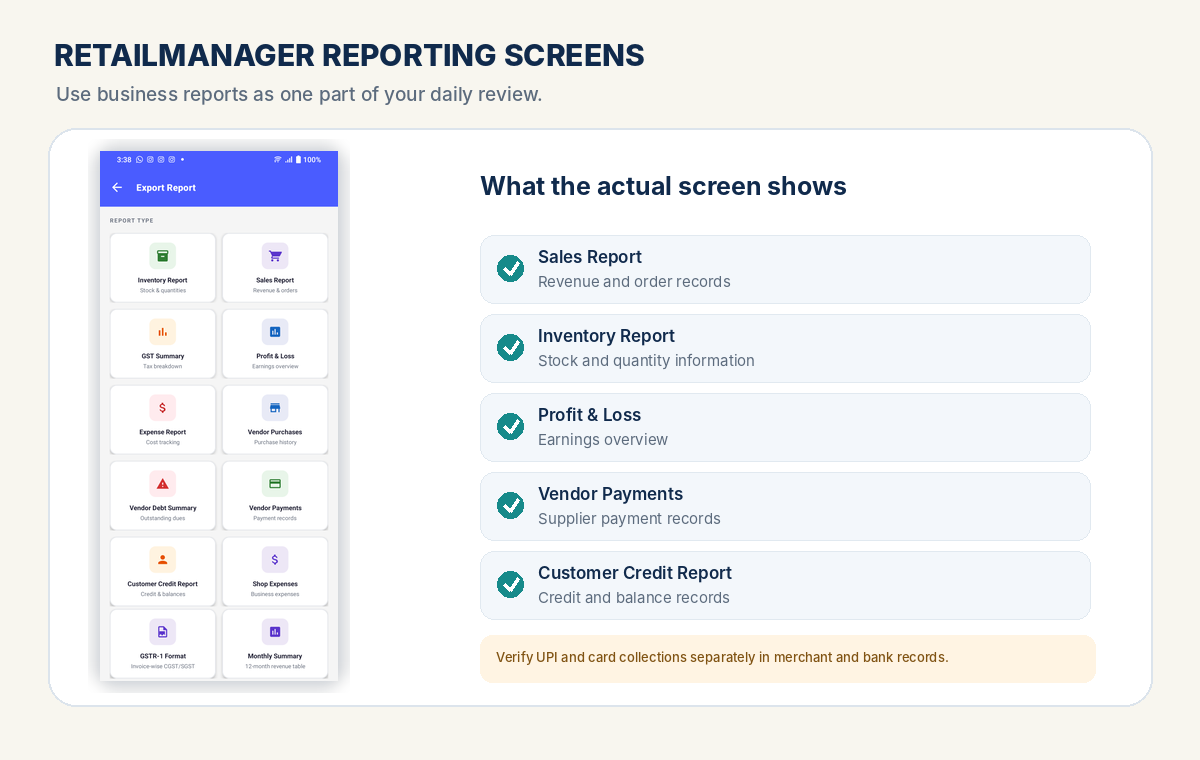
RetailManager offers product, sales, customer, payment, and reporting workflows that retailers can evaluate for their record-keeping needs. Check its current capabilities before relying on any specific automated settlement or bank-reconciliation feature.
Read our guide on how to choose billing software for small shops in India to understand what to evaluate before selecting a system.
Frequently Asked Questions
What is UPI payment reconciliation?
UPI payment reconciliation is the process of comparing UPI payments recorded against retail sales with the successful transactions shown in the merchant payment records and relevant bank credits.
How should a retailer verify a UPI payment?
Check the transaction in your own merchant UPI application, bank account, payment terminal, or acquiring-provider dashboard. Match the amount and transaction reference with the original bill. Do not rely only on a customer's screenshot.
What should I do if a customer says their UPI payment is pending?
Check your merchant payment records and available transaction status. Keep the payment marked as pending until it is confirmed or resolved. Avoid collecting the same amount again without checking the original transaction first.
Why does the UPI payment report differ from the bank statement?
Possible reasons include pending transactions, refunds, reversals, transactions made through another merchant account, incorrect records, or timing differences. Compare individual transaction references rather than relying only on the total.
Should credit sales be included in daily payment collections?
No. Credit sales are recorded as sales, but the amount remains outstanding until the customer pays. Keep sales totals and actual payment collections separate.
How often should a retail shop reconcile payments?
Daily reconciliation is a useful routine for most shops that process regular cash and digital payments. Higher-volume businesses may also review payment status throughout the day.
Can billing software automatically reconcile UPI payments?
Some solutions provide payment integrations or automated matching, while others only record the payment method and generate reports. Check the exact capabilities of the application and your payment provider before assuming that reconciliation is automatic.
Conclusion
UPI payment reconciliation helps retail shop owners understand whether the money recorded against their sales has actually been received.
Start by recording every transaction with the correct payment method, verifying UPI confirmations, counting cash, reviewing card settlements, and separating credit sales from actual collections.
When a payment is pending or a difference appears, investigate the transaction reference and payment status rather than making an unexplained adjustment.
Whether you operate a kirana store, pharmacy, hardware shop, clothing business, fertilizer shop, or mobile accessories store, a consistent daily reconciliation process can help you maintain more accurate records and manage your shop's money with greater confidence.
- #UPI Payments
- #Payment Reconciliation
- #Retail Billing
- #Digital Payments
- #Small Business Finance