Retail Operations
Daily Retail Shop Checklist: Opening, During Business & Closing
A practical daily retail shop checklist covering opening, customer service, stock, billing, cash checks, and closing tasks for small retailers.
Daily Retail Shop Checklist: Opening, During Business & Closing
A daily retail shop checklist helps you prepare your store before opening, serve customers efficiently during business hours, and close the day with accurate records. Instead of relying on memory, you can follow a simple routine to check stock, billing, payments, cleanliness, and other important tasks.
Whether you run a kirana store, pharmacy, hardware shop, fertilizer business, clothing store, or mobile accessories shop, a consistent daily routine can help you catch small problems before they become bigger ones.
You do not need a complicated system to get started. Use the checklists below as a practical starting point, then adapt them to your products, staff, store size, and business requirements.
1. Before Opening: Prepare Your Shop for the Day
Complete these checks before customers begin arriving.
Store readiness
- Open the shop safely and check the entrance, shutters, locks, and visible signs of damage.
- Switch on the necessary lights, fans, air conditioning, and equipment.
- Check that counters, floors, shelves, and customer areas are clean and organised.
- Arrange products neatly and ensure important items are easy to find.
- Check that displayed prices and promotional signs are accurate.
- Remove damaged, expired, or unsuitable products from sale where applicable.
Stock and product availability
- Check fast-moving products and essential items.
- Identify products that are out of stock or running low.
- Replenish shelves from available backroom stock.
- Review pending supplier deliveries and important expected arrivals.
- Check expiry dates, batch details, or storage conditions where relevant to your product category.
For example, a grocery shop may need to pay close attention to everyday essentials and expiry dates, while a mobile accessories shop may prioritise popular cables, chargers, and screen protectors.
Do not try to count every product from scratch each morning. Focus on items that are important for that day's operations and use regular stock reviews for broader inventory checks.
For a more detailed approach, read our guide on how to prevent stockouts in a retail shop.
Billing and payment readiness
- Switch on the billing device and check that the software opens correctly.
- Confirm that the receipt printer and other billing equipment work, if used.
- Check the available payment methods, including UPI, card, or cash.
- Confirm that the internet connection works if your systems depend on it.
- Prepare the opening cash float if your shop accepts cash.
- Make sure staff know how to handle routine billing questions and payment problems.
If your shop uses a digital billing system, resolving basic equipment or login issues before opening can help avoid delays when customers arrive.
2. During Business Hours: Keep Operations Running Smoothly
The work does not stop after the shop opens. A few short checks throughout the day can help maintain service, product availability, and accurate records.
Customer service
- Greet customers politely and help them find products.
- Answer questions clearly and provide accurate product information.
- Keep walkways and access to important products clear.
- Monitor queues and provide additional billing support when needed.
- Record frequently requested products that are unavailable.
- Note recurring complaints or suggestions that may require action.
Customer feedback can reveal useful opportunities. If several customers ask for the same unavailable product, review whether it makes sense to include it in your purchasing plan.
For more ideas, see our guide on how to increase retail sales in a small shop.
Billing and transaction records
- Record each completed sale correctly.
- Check that the right product, quantity, and selling price appear on the bill.
- Apply discounts only when they are permitted and correctly recorded.
- Record returns, cancellations, and other adjustments using the appropriate process.
- Record expenses separately from sales.
- Verify digital payment receipts instead of relying only on a customer's screenshot.
For GST-registered businesses, check the invoice requirements applicable to your transactions using the official CBIC GST invoice rules. Requirements can differ depending on the business and transaction, so seek professional tax advice when necessary.
If billing is becoming slow or difficult to manage, our guide on how to choose billing software for small shops in India explains what to consider.
Stock replenishment and deliveries
- Refill shelves when important products run low.
- Keep received goods separate until they have been checked.
- Compare supplier deliveries with the relevant order or delivery documents.
- Record missing, incorrect, or damaged items.
- Update stock records according to the quantity actually accepted.
- Keep pending deliveries visible so they are not forgotten.
For example, if you ordered 50 units but received only 45, record the actual quantity received and follow up on the remaining five units. Do not mark the whole order as received unless the remaining goods have arrived or the order has been formally resolved.
Use our guide to managing supplier purchases and purchase orders for a more detailed purchasing process.
3. Midday Check: Correct Small Problems Early
A short midday review is useful for shops with steady customer traffic or several employees. It does not need to interrupt normal business.
- Check whether popular products need replenishment.
- Tidy the checkout counter and customer-facing areas.
- Confirm that displayed prices and promotional signs remain correct.
- Resolve any outstanding billing or payment issues.
- Check whether deliveries or customer requests need follow-up.
- Confirm that staff know which tasks need attention during the remainder of the day.
This is also a useful time to review the day's progress against your expectations. If sales are unusually busy, focus on keeping service and stock availability consistent. If the shop is quiet, staff can organise shelves, review product requests, and complete other suitable tasks.
Avoid adding unnecessary checks simply to make the checklist longer. Choose activities that solve real operational problems in your shop.
4. Before Closing: Reconcile the Day's Records
Closing the shop involves more than locking the door. It is also an opportunity to identify discrepancies, record outstanding tasks, and prepare for the next day.
Sales and payment reconciliation
- Review the day's sales report.
- Count the cash collected and compare it with the relevant cash records.
- Check UPI, card, and other digital transactions against the available payment records.
- Investigate differences rather than adjusting amounts without an explanation.
- Review unusual refunds, cancellations, discounts, or transaction corrections.
- Record the closing cash balance according to your normal procedure.
For example, a shop may record ₹18,000 in sales but collect part of that amount through different payment methods. The cash drawer will not necessarily contain the full sales amount.
Compare each payment method with its corresponding record. This makes it easier to identify missing entries, settlement delays, or mistakes.
Remember that sales revenue, cash collected, profit, and expenses are different measures. For help understanding business performance, read how to calculate daily sales and profit in a retail shop.
Expenses and stock records
- Record business expenses with the relevant details and supporting documents.
- Note damaged goods, stock discrepancies, and products requiring follow-up.
- Record supplier deliveries that remain incomplete.
- List products that should be reordered.
- Review customer or supplier matters that need attention the next day.
- Keep bills, receipts, and other business records organised.
Do not postpone all expense entries until the end of the month. Recording them consistently makes later reviews easier. Our guide on how to track daily expenses in a retail shop covers this in more detail.
Store security and shutdown
- Secure cash, important documents, and valuable items according to your store procedure.
- Switch off equipment that does not need to remain powered on.
- Check the shop's doors, shutters, windows, and other access points.
- Set alarms or security systems where installed.
- Leave the main counter and important areas organised for the next opening.
- Record any maintenance, safety, or security issue that needs attention.
Follow the security and shutdown procedures appropriate to your premises and equipment.
5. A Quick Daily Retail Shop Checklist You Can Save or Print
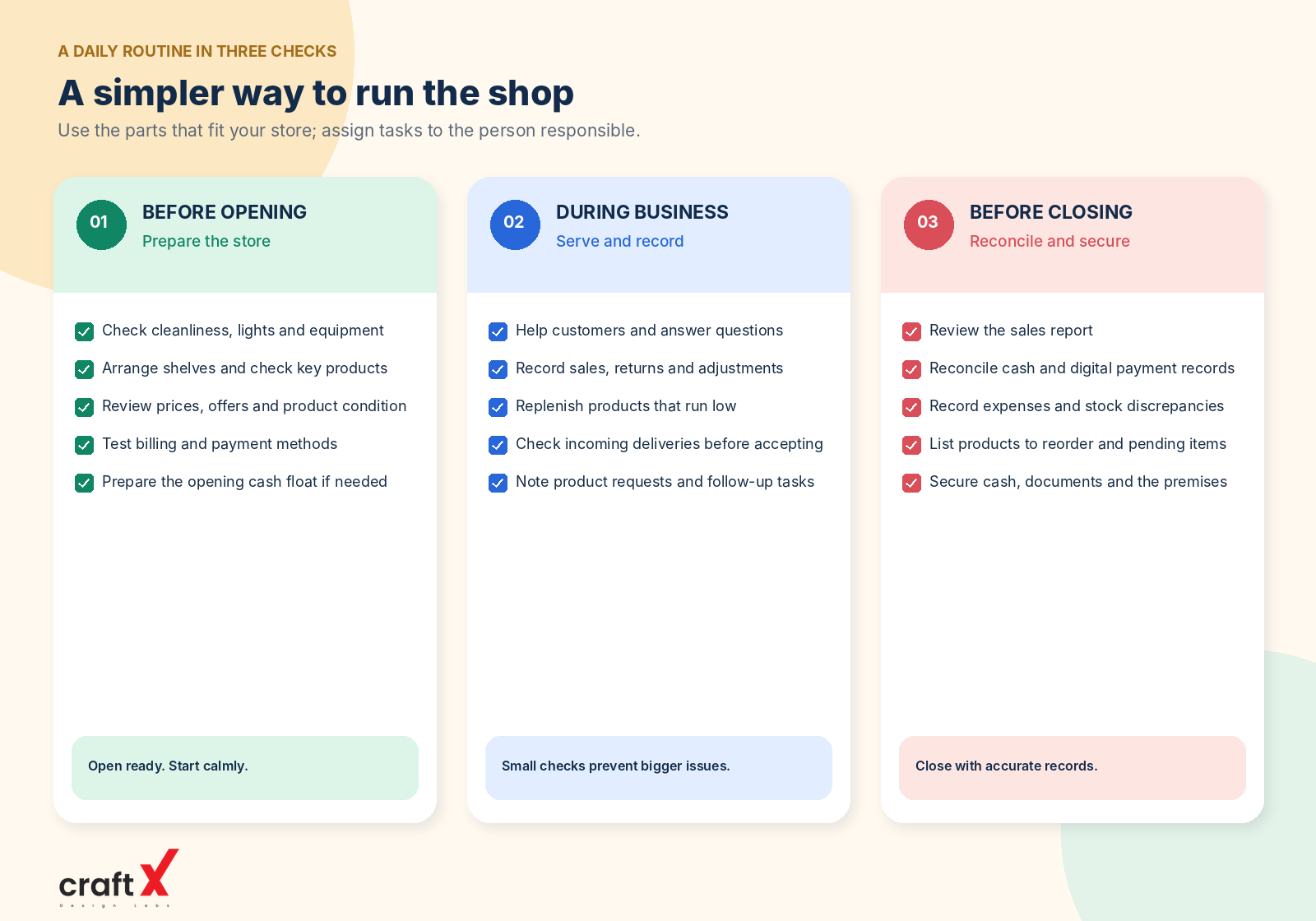
Use this condensed version when you need a quick reminder during the working day.
Opening
- Check safety, cleanliness, lights, and equipment.
- Arrange shelves and confirm important products are available.
- Review prices, offers, and product condition.
- Test billing and payment methods.
- Prepare staff and opening cash where needed.
During business
- Serve customers and keep the shop organised.
- Record sales, returns, and expenses correctly.
- Replenish important products and check incoming deliveries.
- Resolve billing, price, or payment discrepancies.
- Note product requests and tasks requiring follow-up.
Closing
- Review sales and reconcile payment records.
- Record expenses and relevant stock discrepancies.
- List pending deliveries and products to reorder.
- Secure cash, documents, and the premises.
- Prepare a short list of priorities for tomorrow.
You can print this section and keep it near the billing counter or in the shop office. If multiple employees work in the shop, assign responsibility for completing each task so that important checks are not missed.
6. Which Tasks Should Be Done Weekly Instead?
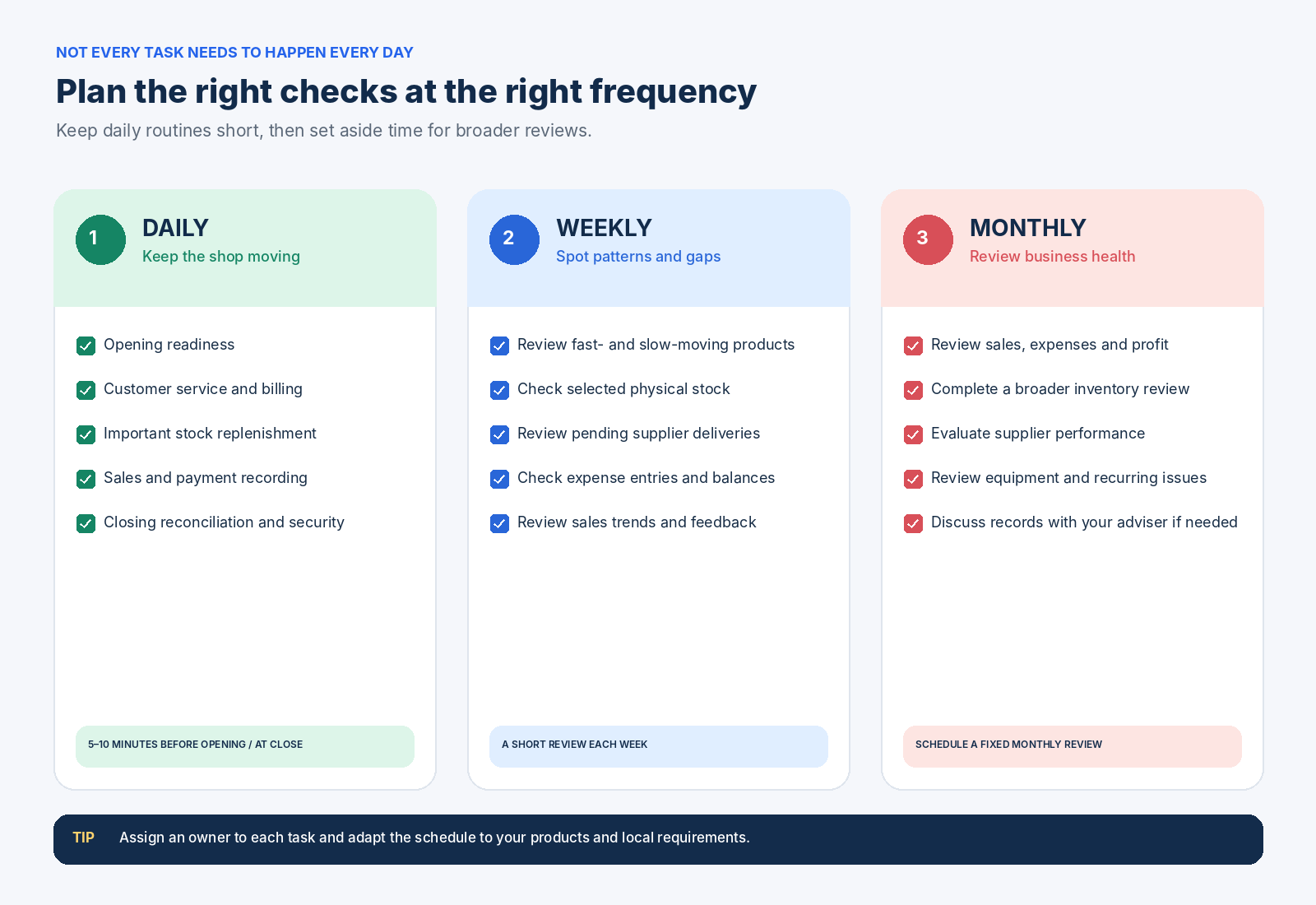
Not every business activity needs to happen every day. Moving broader reviews to a weekly or monthly schedule keeps the daily checklist manageable.
Weekly tasks
- Review fast-moving and slow-moving products.
- Check selected physical stock against records.
- Review outstanding supplier balances and pending deliveries.
- Check recorded expenses and identify unusual changes.
- Review sales trends and the results of promotions.
- Follow up on repeated customer complaints and product requests.
Monthly tasks
- Review overall sales, expenses, and profitability.
- Conduct a broader inventory review appropriate to the shop.
- Review supplier performance and purchasing arrangements.
- Check equipment maintenance and recurring operational problems.
- Review business records with the relevant accountant or adviser where needed.
Food businesses should also follow the hygiene, storage, and food-safety requirements applicable to their type of operation. The Food Safety and Standards Authority of India (FSSAI) publishes official hygiene guidance for food businesses.
For shops that attract customers through local searches, periodically confirm that business information such as opening hours is accurate. Google's Business Profile help guide explains how to update business details, including hours and photos.
7. Adapt the Checklist to Your Type of Shop
A daily checklist should reflect what your business sells and how it operates.
Grocery and kirana shops: Prioritise fast-moving essentials, product condition, expiry checks where applicable, shelf replenishment, and billing accuracy.
Pharmacies: Follow the applicable requirements for storage, expiry monitoring, authorised handling, and product records. Do not use a general retail checklist as a substitute for pharmacy-specific obligations.
Hardware shops: Check commonly requested items, product variants, quantities, safe storage, and pending supplier deliveries.
Fertilizer and agricultural supply shops: Monitor seasonal demand, product condition, stock availability, and the requirements applicable to the products you sell.
Clothing and mobile accessories shops: Keep product displays organised, maintain variant information such as size or model compatibility, and pay attention to items customers request frequently.
Use the common opening, operating, and closing routines as a foundation, then add only the extra checks that genuinely apply to your products and local requirements.
8. How Digital Records Can Make the Routine Easier
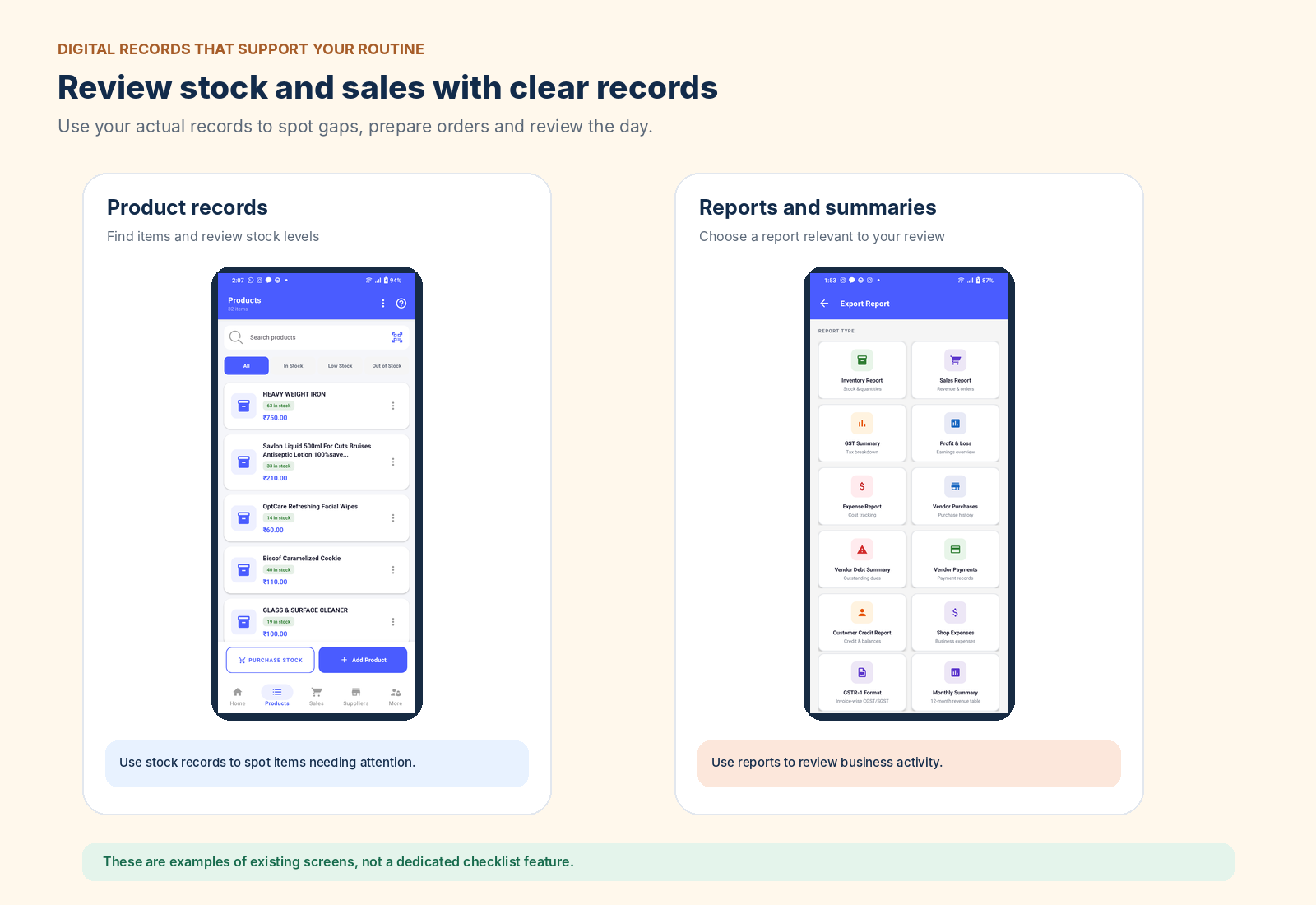
A paper checklist can work well for a small shop. However, as the number of products, transactions, suppliers, and employees increases, maintaining all records manually can become more difficult.
A suitable retail-management system may help you review sales, maintain product records, record purchases, and organise business information in one place. The exact features vary between applications, so confirm that a system supports your workflow before relying on it.
You do not need to automate every task immediately. Start with the areas where mistakes or delays happen most often, such as billing, stock records, purchase entries, or daily sales reviews.
If you are comparing paper records with digital tools, see our guide on manual stock registers versus inventory software.
RetailManager is another option to evaluate for your shop's daily operations. Explore RetailManager on Google Play and review its current features to determine whether they meet your requirements.
Conclusion
A daily retail shop checklist helps you create a consistent routine for opening, serving customers, tracking stock, recording transactions, and closing securely.
Start with the essential checks: prepare the store, make sure billing works, keep important products available, record transactions accurately, reconcile payments, and leave clear notes for the next day.
Review the checklist regularly and adapt it as your business grows. Whether you operate a kirana store, pharmacy, hardware shop, fertilizer business, clothing store, or mobile accessories shop, a practical routine can help you work more consistently and spot problems earlier.
- #Retail Shop Checklist
- #Shop Management
- #Retail Operations
- #Stock Checks
- #Daily Business Routine